
2.3 KiB
2.3 KiB
title, intro, redirect_from, versions, shortTitle
| title | intro | redirect_from | versions | shortTitle | ||||
|---|---|---|---|---|---|---|---|---|
| Cloning a repository from GitHub to GitHub Desktop | You can use {% data variables.product.prodname_dotcom %} to clone remote repositories to {% data variables.product.prodname_desktop %}. |
|
|
Clone a GitHub repo |
{% tip %}
Tip: You also can use {% data variables.product.prodname_desktop %} to clone repositories that exist on {% data variables.product.prodname_dotcom %}. For more information, see "Cloning a repository from {% data variables.product.prodname_desktop %}."
{% endtip %}
{% mac %}
- Sign in to {% data variables.product.product_location %} and {% data variables.product.prodname_desktop %} before you start to clone. {% data reusables.repositories.navigate-to-repo %} {% data reusables.repositories.open-with-github-desktop %}
- Click Choose... and, using the Finder window, navigate to a local path where you want to clone the repository.


{% note %}
Note: If the repository is configured to use LFS, you will be prompted to initialize {% data variables.large_files.product_name_short %}.
{% endnote %}
- Click Clone.
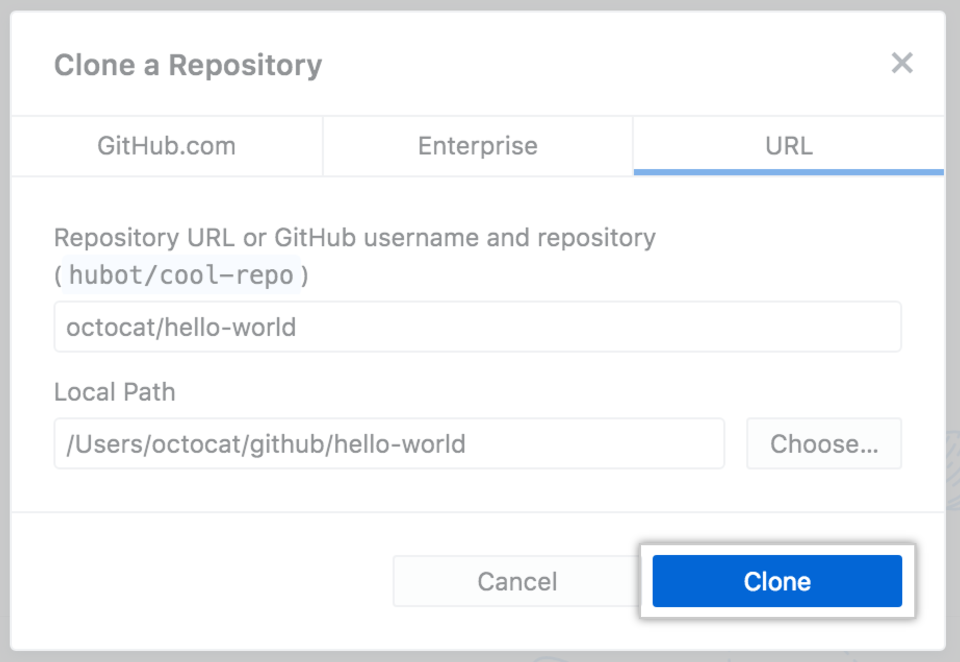

{% endmac %}
{% windows %}
- Sign in to {% data variables.product.product_location %} and {% data variables.product.prodname_desktop %} before you start to clone. {% data reusables.repositories.navigate-to-repo %} {% data reusables.repositories.open-with-github-desktop %}
- Click Choose... and, using Windows Explorer, navigate to a local path where you want to clone the repository.


{% note %}
Note: If the repository is configured to use LFS, you will be prompted to initialize {% data variables.large_files.product_name_short %}.
{% endnote %}
- Click Clone.


{% endwindows %}