Hackathon Starter [](https://david-dm.org/sahat/hackathon-starter) [](https://travis-ci.org/sahat/hackathon-starter) [](https://github.com/igrigorik/ga-beacon)
=======================
:octocat: **Live Demo**: http://hackathonstarter.herokuapp.com
Jump to [What's new in 2.3.3?](#changelog)
A boilerplate for **Node.js** web applications.
If you have attended any hackathons in the past, then you know how much time it takes to
get a project started: decide on what to build, pick a programming language, pick a web framework,
pick a CSS framework. A while later, you might have an initial project up on GitHub and only then
can other team members start contributing. Or how about doing something as simple as *Sign in with Facebook*
authentication? You can spend hours on it if you are not familiar with how OAuth 2.0 works.
When I started this project, my primary focus was on **simplicity** and **ease of use**.
I also tried to make it as **generic** and **reusable** as possible to cover most use cases of hackathon web apps,
without being too specific. In the worst case you can use this as a learning guide for your projects,
if for example you are only interested in **Sign in with Google** authentication and nothing else.
Chances are you do not need all authentication methods or API examples. As of **Hackathon Starter 2.1**
it is possible to selectively check which authentication methods you need by running `node setup.js`.
Modern Theme

Flatly Bootstrap Theme

Default Theme

Hackathon Starter Generator
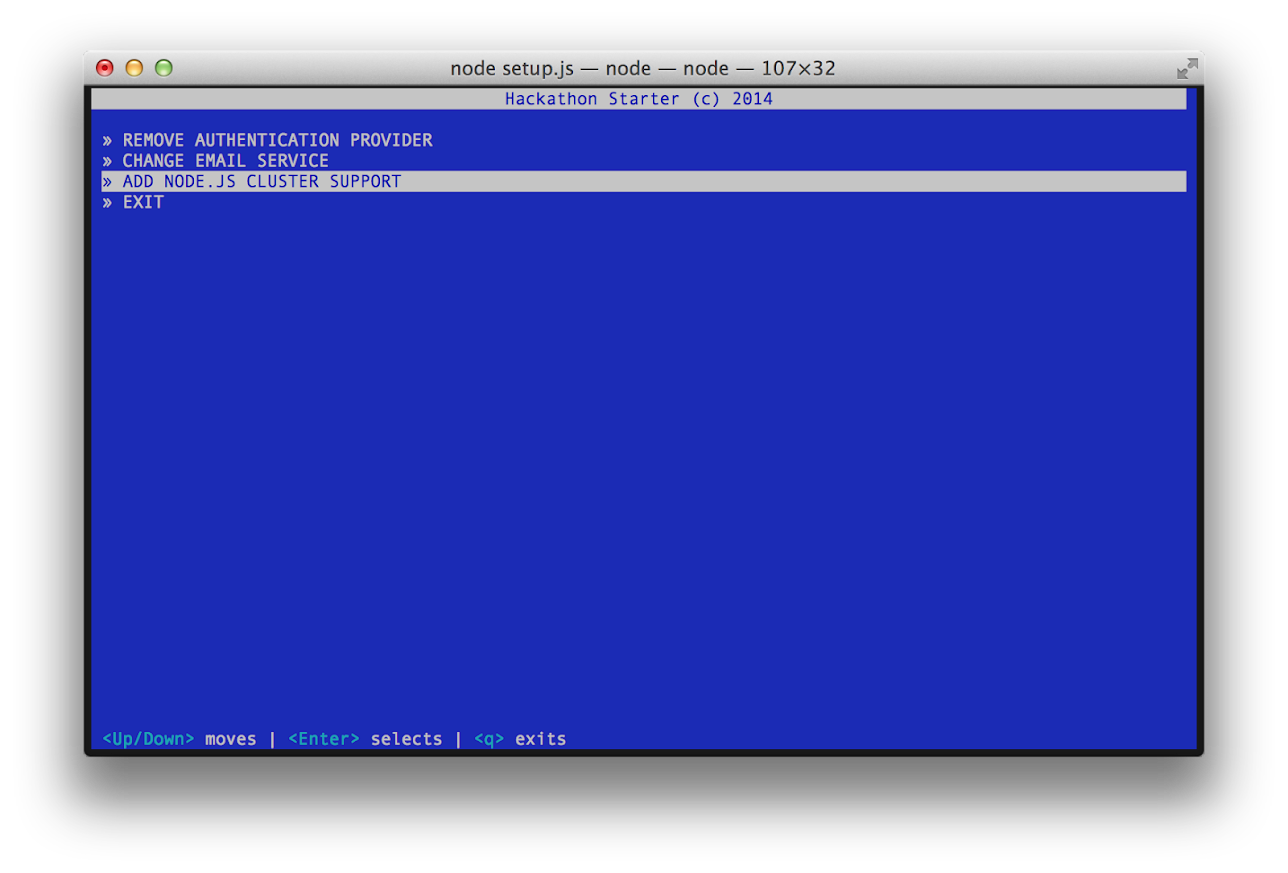
Table of Contents
-----------------
- [Features](#features)
- [Prerequisites](#prerequisites)
- [Getting Started](#getting-started)
- [Generator](#generator)
- [Obtaining API Keys](#obtaining-api-keys)
- [Project Structure](#project-structure)
- [List of Packages](#list-of-packages)
- [Useful Tools and Resources](#useful-tools-and-resources)
- [Recommended Design Resources](#recommended-design-resources)
- [Recommended Node.js Libraries](#recommended-nodejs-libraries)
- [Recommended Client-side Libraries](#recommended-client-side-libraries)
- [Pro Tips](#pro-tips)
- [FAQ](#faq)
- [How It Works](#how-it-works-mini-guides)
- [Mongoose Cheatsheet](#mongoose-cheatsheet)
- [Deployment](#deployment)
- [Changelog](#changelog)
- [Contributing](#contributing)
- [License](#license)
Features
--------
- **Local Authentication** using Email and Password
- **OAuth 1.0a Authentication** via Twitter
- **OAuth 2.0 Authentication** via Facebook, Google, GitHub, LinkedIn, Instagram
- Flash notifications
- MVC Project Structure
- Node.js clusters support
- Rails 3.1-style asset pipeline by connect-assets (See FAQ)
- LESS stylesheets (auto-compiled without any Gulp/Grunt hassle)
- Bootstrap 3 + Flat UI + iOS7
- Contact Form (powered by Mailgun, Sendgrid or Mandrill)
- **Account Management**
- Gravatar
- Profile Details
- Change Password
- Forgot Password
- Reset Password
- Link multiple OAuth strategies to one account
- Delete Account
- CSRF protection
- **API Examples**: Facebook, Foursquare, Last.fm, Tumblr, Twitter, Stripe, LinkedIn and more.
Prerequisites
-------------
- [MongoDB](http://www.mongodb.org/downloads)
- [Node.js](http://nodejs.org)
- Command Line Tools
-  **Mac OS X**: [Xcode](https://itunes.apple.com/us/app/xcode/id497799835?mt=12) (or **OS X 10.9 Mavericks**: `xcode-select --install`)
-
**Mac OS X**: [Xcode](https://itunes.apple.com/us/app/xcode/id497799835?mt=12) (or **OS X 10.9 Mavericks**: `xcode-select --install`)
-  **Windows**: [Visual Studio](http://www.visualstudio.com/downloads/download-visual-studio-vs#d-express-windows-8)
-
**Windows**: [Visual Studio](http://www.visualstudio.com/downloads/download-visual-studio-vs#d-express-windows-8)
-  **Ubuntu**: `sudo apt-get install build-essential`
-
**Ubuntu**: `sudo apt-get install build-essential`
-  **Fedora**: `sudo yum groupinstall "Development Tools"`
-
**Fedora**: `sudo yum groupinstall "Development Tools"`
-  **OpenSUSE**: `sudo zypper install --type pattern devel_basis`
:exclamation: **Note:** If you are new to Node or Express, I recommend to watch
[Node.js and Express 101](http://www.youtube.com/watch?v=BN0JlMZCtNU)
screencast by Alex Ford that teaches Node and Express from scratch. Alternatively,
here is another great tutorial for complete beginners - [Getting Started With Node.js, Express, MongoDB](http://cwbuecheler.com/web/tutorials/2013/node-express-mongo/).
Getting Started
---------------
The easiest way to get started is to clone the repository:
```bash
# Get the latest snapshot
git clone --depth=1 https://github.com/sahat/hackathon-starter.git myproject
cd myproject
# Install NPM dependencies
npm install
node app.js
```
:exclamation: **Note:** I highly recommend installing [Nodemon](https://github.com/remy/nodemon).
It watches for any changes in your node.js app and automatically restarts the
server. Once installed, instead of `node app.js` use `nodemon app.js`. It will
save you a lot of time in the long run, because you won't need to manually
restart the server each time you make a small change in code. To install, run
`sudo npm install -g nodemon`.
Generator
---------
Hackathon Starter Generator is currently in the experimental stage. It is tighly
tied to the project code. As soon as you start changing and moving things around,
it will probably no longer work as expected. That is why it's best to use when
you first download the project.
Currently it supports removing authentication providers, switching
between SendGrid, Mailgun and Mandrill email services and adding a Node.js
cluster support.
To get started, run: `node setup.js`.
:exclamation: **Note:** Generator has a "destructive" behavior, it will physically
modify your code. *There is no undo action.* To be on a safe side, always commit
your code to Git, so you could go back and revert the changes.
Obtaining API Keys
------------------
To use any of the included APIs or OAuth authentication methods, you will need
to obtain appropriate credentials: Client ID, Client Secret, API Key, or
Username & Password. You will need to go through each provider to generate new
credentials.
**Hackathon Starter 2.0 Update:** I have included dummy keys and passwords for
all API examples to get you up and running even faster. But don't forget to update
them with *your credentials* when you are ready to deploy an app.
**OpenSUSE**: `sudo zypper install --type pattern devel_basis`
:exclamation: **Note:** If you are new to Node or Express, I recommend to watch
[Node.js and Express 101](http://www.youtube.com/watch?v=BN0JlMZCtNU)
screencast by Alex Ford that teaches Node and Express from scratch. Alternatively,
here is another great tutorial for complete beginners - [Getting Started With Node.js, Express, MongoDB](http://cwbuecheler.com/web/tutorials/2013/node-express-mongo/).
Getting Started
---------------
The easiest way to get started is to clone the repository:
```bash
# Get the latest snapshot
git clone --depth=1 https://github.com/sahat/hackathon-starter.git myproject
cd myproject
# Install NPM dependencies
npm install
node app.js
```
:exclamation: **Note:** I highly recommend installing [Nodemon](https://github.com/remy/nodemon).
It watches for any changes in your node.js app and automatically restarts the
server. Once installed, instead of `node app.js` use `nodemon app.js`. It will
save you a lot of time in the long run, because you won't need to manually
restart the server each time you make a small change in code. To install, run
`sudo npm install -g nodemon`.
Generator
---------
Hackathon Starter Generator is currently in the experimental stage. It is tighly
tied to the project code. As soon as you start changing and moving things around,
it will probably no longer work as expected. That is why it's best to use when
you first download the project.
Currently it supports removing authentication providers, switching
between SendGrid, Mailgun and Mandrill email services and adding a Node.js
cluster support.
To get started, run: `node setup.js`.
:exclamation: **Note:** Generator has a "destructive" behavior, it will physically
modify your code. *There is no undo action.* To be on a safe side, always commit
your code to Git, so you could go back and revert the changes.
Obtaining API Keys
------------------
To use any of the included APIs or OAuth authentication methods, you will need
to obtain appropriate credentials: Client ID, Client Secret, API Key, or
Username & Password. You will need to go through each provider to generate new
credentials.
**Hackathon Starter 2.0 Update:** I have included dummy keys and passwords for
all API examples to get you up and running even faster. But don't forget to update
them with *your credentials* when you are ready to deploy an app.
 - Visit [Google Cloud Console](https://cloud.google.com/console/project)
- Click **CREATE PROJECT** button
- Enter *Project Name*, then click **CREATE**
- Then select *APIs & auth* from the sidebar and click on *Credentials* tab
- Click **CREATE NEW CLIENT ID** button
- **Application Type**: Web Application
- **Authorized Javascript origins**: http://localhost:3000
- **Authorized redirect URI**: http://localhost:3000/auth/google/callback
- Copy and paste *Client ID* and *Client secret* keys into `config/secrets.js`
:exclamation: **Note:** When you ready to deploy to production don't forget to
add your new url to *Authorized Javascript origins* and *Authorized redirect URI*,
e.g. `http://my-awesome-app.herokuapp.com` and
`http://my-awesome-app.herokuapp.com/auth/google/callback` respectively.
The same goes for other providers.
- Visit [Google Cloud Console](https://cloud.google.com/console/project)
- Click **CREATE PROJECT** button
- Enter *Project Name*, then click **CREATE**
- Then select *APIs & auth* from the sidebar and click on *Credentials* tab
- Click **CREATE NEW CLIENT ID** button
- **Application Type**: Web Application
- **Authorized Javascript origins**: http://localhost:3000
- **Authorized redirect URI**: http://localhost:3000/auth/google/callback
- Copy and paste *Client ID* and *Client secret* keys into `config/secrets.js`
:exclamation: **Note:** When you ready to deploy to production don't forget to
add your new url to *Authorized Javascript origins* and *Authorized redirect URI*,
e.g. `http://my-awesome-app.herokuapp.com` and
`http://my-awesome-app.herokuapp.com/auth/google/callback` respectively.
The same goes for other providers.
 - Visit [Facebook Developers](https://developers.facebook.com/)
- Click **Apps > Create a New App** in the navigation bar
- Enter *Display Name*, then choose a category, then click **Create app**
- Copy and paste *App ID* and *App Secret* keys into `config/secrets.js`
- *App ID* is **clientID**, *App Secret* is **clientSecret**
- Click on *Settings* on the sidebar, then click **+ Add Platform**
- Select **Website**
- Enter `http://localhost:3000` for *Site URL*
:exclamation: **Note:** After a successful sign in with Facebook, a user will be redirected back to home page with appended hash `#_=_` in the URL. It is *not* a bug. See this [Stack Overflow](https://stackoverflow.com/questions/7131909/facebook-callback-appends-to-return-url) discussion for ways to handle it.
- Visit [Facebook Developers](https://developers.facebook.com/)
- Click **Apps > Create a New App** in the navigation bar
- Enter *Display Name*, then choose a category, then click **Create app**
- Copy and paste *App ID* and *App Secret* keys into `config/secrets.js`
- *App ID* is **clientID**, *App Secret* is **clientSecret**
- Click on *Settings* on the sidebar, then click **+ Add Platform**
- Select **Website**
- Enter `http://localhost:3000` for *Site URL*
:exclamation: **Note:** After a successful sign in with Facebook, a user will be redirected back to home page with appended hash `#_=_` in the URL. It is *not* a bug. See this [Stack Overflow](https://stackoverflow.com/questions/7131909/facebook-callback-appends-to-return-url) discussion for ways to handle it.
 - Go to [Account Settings](https://github.com/settings/profile)
- Select **Applications** from the sidebar
- Then inside **Developer applications** click on **Register new application**
- Enter *Application Name* and *Homepage URL*.
- For *Authorization Callback URL*: http://localhost:3000/auth/github/callback
- Click **Register application**
- Now copy and paste *Client ID* and *Client Secret* keys into `config/secrets.js`
- Go to [Account Settings](https://github.com/settings/profile)
- Select **Applications** from the sidebar
- Then inside **Developer applications** click on **Register new application**
- Enter *Application Name* and *Homepage URL*.
- For *Authorization Callback URL*: http://localhost:3000/auth/github/callback
- Click **Register application**
- Now copy and paste *Client ID* and *Client Secret* keys into `config/secrets.js`
 - Sign in at [https://apps.twitter.com/](https://apps.twitter.com/)
- Click **Create a new application**
- Enter your application name, website and description
- For **Callback URL**: http://127.0.0.1:3000/auth/twitter/callback
- Go to **Settings** tab
- Under *Application Type* select **Read and Write** access
- Check the box **Allow this application to be used to Sign in with Twitter**
- Click **Update this Twitter's applications settings**
- Copy and paste *Consumer Key* and *Consumer Secret* keys into `config/secrets.js`
- Sign in at [https://apps.twitter.com/](https://apps.twitter.com/)
- Click **Create a new application**
- Enter your application name, website and description
- For **Callback URL**: http://127.0.0.1:3000/auth/twitter/callback
- Go to **Settings** tab
- Under *Application Type* select **Read and Write** access
- Check the box **Allow this application to be used to Sign in with Twitter**
- Click **Update this Twitter's applications settings**
- Copy and paste *Consumer Key* and *Consumer Secret* keys into `config/secrets.js`
 - Sign in at [LinkedIn Developer Network](http://developer.linkedin.com/)
- From the account name dropdown menu select **API Keys**
- *It may ask you to sign in once again*
- Click **+ Add New Application** button
- Fill out all *required* fields
- For **Default Scope** make sure *at least* the following is checked:
- `r_fullprofile`
- `r_emailaddress`
- `r_network`
- Finish by clicking **Add Application** button
- Copy and paste *API Key* and *Secret Key* keys into `config/secrets.js`
- *API Key* is your **clientID**
- *Secret Key* is your **clientSecret**
- Sign in at [LinkedIn Developer Network](http://developer.linkedin.com/)
- From the account name dropdown menu select **API Keys**
- *It may ask you to sign in once again*
- Click **+ Add New Application** button
- Fill out all *required* fields
- For **Default Scope** make sure *at least* the following is checked:
- `r_fullprofile`
- `r_emailaddress`
- `r_network`
- Finish by clicking **Add Application** button
- Copy and paste *API Key* and *Secret Key* keys into `config/secrets.js`
- *API Key* is your **clientID**
- *Secret Key* is your **clientSecret**
 - Visit the **Account** section of your Venmo profile after logging in
- Click on the **Developers** tab
- Then click on the [new](https://venmo.com/account/app/new) link next to **Your Applications (0)**
- Fill in the required fields: *App Name* and *What Will The App Be Used For?*
- For **Web Redirect URL** enter: http://localhost:3000/auth/venmo/callback
- Hit **Create** button
- Back on the **Developers** tab click on **view** link next to **Your Applications (1) new**
- Copy and paste **ID** and **Secret** keys into `config/secrets.js`
- Visit the **Account** section of your Venmo profile after logging in
- Click on the **Developers** tab
- Then click on the [new](https://venmo.com/account/app/new) link next to **Your Applications (0)**
- Fill in the required fields: *App Name* and *What Will The App Be Used For?*
- For **Web Redirect URL** enter: http://localhost:3000/auth/venmo/callback
- Hit **Create** button
- Back on the **Developers** tab click on **view** link next to **Your Applications (1) new**
- Copy and paste **ID** and **Secret** keys into `config/secrets.js`
 - [Sign up](http://stripe.com) or log into your your [dashboard](https://manage.stripe.com)
- Click on your profile and click on Account Settings
- Then click on [API Keys](https://manage.stripe.com/account/apikeys)
- Copy the **Secret Key**. and add this into `config/secrets.js`
- [Sign up](http://stripe.com) or log into your your [dashboard](https://manage.stripe.com)
- Click on your profile and click on Account Settings
- Then click on [API Keys](https://manage.stripe.com/account/apikeys)
- Copy the **Secret Key**. and add this into `config/secrets.js`
 - Visit [PayPal Developer](https://developer.paypal.com/)
- Log in to your PayPal account
- Click **Applications > Create App** in the navigation bar
- Enter *Application Name*, then click **Create app**
- Copy and paste *Client ID* and *Secret* keys into `config/secrets.js`
- *App ID* is **client_id**, *App Secret* is **client_secret**
- Change **host** to api.paypal.com if you want to test against production and use the live credentials
- Visit [PayPal Developer](https://developer.paypal.com/)
- Log in to your PayPal account
- Click **Applications > Create App** in the navigation bar
- Enter *Application Name*, then click **Create app**
- Copy and paste *Client ID* and *Secret* keys into `config/secrets.js`
- *App ID* is **client_id**, *App Secret* is **client_secret**
- Change **host** to api.paypal.com if you want to test against production and use the live credentials
 - Go to [foursquare for Developers](https://developer.foursquare.com/)
- Click on **My Apps** in the top menu
- Click the **Create A New App** button
- Enter *App Name*, *Welcome page url*,
- For **Redirect URI**: http://localhost:3000/auth/foursquare/callback
- Click **Save Changes**
- Copy and paste *Client ID* and *Client Secret* keys into `config/secrets.js`
- Go to [foursquare for Developers](https://developer.foursquare.com/)
- Click on **My Apps** in the top menu
- Click the **Create A New App** button
- Enter *App Name*, *Welcome page url*,
- For **Redirect URI**: http://localhost:3000/auth/foursquare/callback
- Click **Save Changes**
- Copy and paste *Client ID* and *Client Secret* keys into `config/secrets.js`
 - Go to http://www.tumblr.com/oauth/apps
- Once signed in, click **+Register application**
- Fill in all the details
- For **Default Callback URL**: http://localhost:3000/auth/tumblr/callback
- Click **✔Register**
- Copy and paste *OAuth consumer key* and *OAuth consumer secret* keys into `config/secrets.js`
- Go to http://www.tumblr.com/oauth/apps
- Once signed in, click **+Register application**
- Fill in all the details
- For **Default Callback URL**: http://localhost:3000/auth/tumblr/callback
- Click **✔Register**
- Copy and paste *OAuth consumer key* and *OAuth consumer secret* keys into `config/secrets.js`
 - Go to http://steamcommunity.com/dev/apikey
- Sign in with your existing Steam account
- Enter your *Domain Name*, then and click **Register**
- Copy and paste *Key* into `config/secrets.js`
- Go to http://steamcommunity.com/dev/apikey
- Sign in with your existing Steam account
- Enter your *Domain Name*, then and click **Register**
- Copy and paste *Key* into `config/secrets.js`
 - Go to https://sendgrid.com/user/signup
- Sign up and **confirm** your your account via the *activation email*
- Then enter your SendGrid *Username* and *Password* into `config/secrets.js`
- Go to https://sendgrid.com/user/signup
- Sign up and **confirm** your your account via the *activation email*
- Then enter your SendGrid *Username* and *Password* into `config/secrets.js`
 - Go to http://www.mailgun.com
- Sign up and add your *Domain Name*
- From the domain overview, copy and paste the default SMTP *Login* and *Password* into `config/secrets.js`
- Go to http://www.mailgun.com
- Sign up and add your *Domain Name*
- From the domain overview, copy and paste the default SMTP *Login* and *Password* into `config/secrets.js`
 - Go to http://mandrill.com
- Sign up and add your *Domain Name*
- From the dashboard, click on *Get SMTP credentials*
- Copy and paste the default SMTP *Login* and *Password* into `config/secrets.js`
Project Structure
-----------------
| Name | Description |
| ---------------------------------- |:-----------------------------------------------------------:|
| **config**/passport.js | Passport Local and OAuth strategies, plus login middleware. |
| **config**/secrets.js | Your API keys, tokens, passwords and database URL. |
| **controllers**/api.js | Controller for /api route and all api examples. |
| **controllers**/contact.js | Controller for contact form. |
| **controllers**/home.js | Controller for home page (index). |
| **controllers**/user.js | Controller for user account management. |
| **models**/User.js | Mongoose schema and model for User. |
| **public**/ | Static assets (fonts, css, js, img). |
| **public**/**js**/application.js | Specify client-side JavaScript dependencies. |
| **public**/**js**/main.js | Place your client-side JavaScript here. |
| **public**/**css**/styles.less | Main stylesheet for your app. |
| **public/css/themes**/default.less | Some Bootstrap overrides to make it look prettier. |
| **views/account**/ | Templates for *login, password reset, signup, profile*. |
| **views/api**/ | Templates for API Examples. |
| **views/partials**/flash.jade | Error, info and success flash notifications. |
| **views/partials**/navigation.jade | Navbar partial template. |
| **views/partials**/footer.jade | Footer partial template. |
| **views**/layout.jade | Base template. |
| **views**/home.jade | Home page template. |
| app.js | Main application file. |
| setup.js | Tool for removing authentication providers and other things.|
:exclamation: **Note:** There is no preference how you name or structure your views.
You could place all your templates in a top-level `views` directory without
having a nested folder structure, if that makes things easier for you.
Just don't forget to update `extends ../layout` and corresponding
`res.render()` paths in controllers.
List of Packages
----------------
| Package | Description |
| ------------------------------- |:-------------:|
| async | Utility library that provides asynchronous control flow. |
| bcrypt-nodejs | Library for hashing and salting user passwords. |
| cheerio | Scrape web pages using jQuery-style syntax. |
| clockwork | Clockwork SMS API library. |
| connect-assets | Compiles LESS stylesheets, concatenates & minifies JavaScript. |
| connect-mongo | MongoDB session store for Express. |
| csso | Dependency for connect-assets library to minify CSS. |
| express | Node.js web framework. |
| body-parser | Express 4.0 middleware. |
| cookie-parser | Express 4.0 middleware. |
| express-session | Express 4.0 middleware. |
| morgan | Express 4.0 middleware. |
| compression | Express 4.0 middleware. |
| errorhandler | Express 4.0 middleware. |
| method-override | Express 4.0 middleware. |
| express-flash | Provides flash messages for Express. |
| express-validator | Easy form validation for Express. |
| fbgraph | Facebook Graph API library. |
| github-api | GitHub API library. |
| jade | Template engine for Express. |
| lastfm | Last.fm API library. |
| instagram-node | Instagram API library. |
| less | LESS compiler. Used implicitly by connect-assets. |
| lusca | CSRF middleware. |
| mongoose | MongoDB ODM. |
| node-foursquare | Foursquare API library. |
| node-linkedin | LinkedIn API library. |
| nodemailer | Node.js library for sending emails. |
| passport | Simple and elegant authentication library for node.js |
| passport-facebook | Sign-in with Facebook plugin. |
| passport-github | Sign-in with GitHub plugin. |
| passport-google-oauth | Sign-in with Google plugin. |
| passport-twitter | Sign-in with Twitter plugin. |
| passport-instagram | Sign-in with Instagram plugin. |
| passport-local | Sign-in with Username and Password plugin. |
| passport-linkedin-oauth2 | Sign-in with LinkedIn plugin. |
| passport-oauth | Allows you to set up your own OAuth 1.0a and OAuth 2.0 strategies. |
| request | Simplified HTTP request library. |
| stripe | Offical Stripe API library. |
| tumblr.js | Tumblr API library. |
| twilio | Twilio API library. |
| twit | Twitter API library. |
| lodash | Handy JavaScript utlities library. |
| uglify-js | Dependency for connect-assets library to minify JS. |
| validator | Used in conjunction with express-validator in **controllers/api.js**. |
| mocha | Test framework. |
| chai | BDD/TDD assertion library. |
| supertest | HTTP assertion library. |
| multiline | Multi-line strings for the generator. |
| blessed | Interactive command line interface for the generator. |
| yui | Used by the Yahoo API example. |
Useful Tools and Resources
--------------------------
- [JSDB.io](http://www.jsdb.io) - The Database of JavaScript Libraries
- [JS Recipes](http://jsrecipes.org) - JavaScript tutorials for backend and frontend development.
- [Jade Syntax Documentation by Example](http://naltatis.github.io/jade-syntax-docs/#attributes) - Even better than official Jade docs.
- [HTML to Jade converter](http://html2jade.aaron-powell.com) - Extremely valuable when you need to quickly copy and paste HTML snippets from the web.
- [JavascriptOO](http://www.javascriptoo.com/) - A directory of JavaScript libraries with examples, CDN links, statistics, and videos.
- [Favicon Generator](http://realfavicongenerator.net/) - Generate favicons for PC, Android, iOS, Windows 8.
Recommended Design Resources
----------------------------
- [Code Guide](http://codeguide.co/) - Standards for developing flexible, durable, and sustainable HTML and CSS.
- [Bootsnipp](http://bootsnipp.com/) - Code snippets for Bootstrap.
- [UIBox](http://www.uibox.in) - Curated HTML, CSS, JS, UI components.
- [Bootstrap Zero](http://bootstrapzero.com/) - Free Bootstrap templates themes.
- [Google Bootstrap](http://todc.github.io/todc-bootstrap/) - Google-styled theme for Bootstrap.
- [Font Awesome Icons](http://fortawesome.github.io/Font-Awesome/icons/) - It's already part of the Hackathon Starter, so use this page as a reference.
- [Colors](http://clrs.cc) - A nicer color palette for the web.
- [Creative Button Styles](http://tympanus.net/Development/CreativeButtons/) - awesome button styles.
- [Creative Link Effects](http://tympanus.net/Development/CreativeLinkEffects/) - Beautiful link effects in CSS.
- [Medium Scroll Effect](http://codepen.io/andreasstorm/pen/pyjEh) - Fade in/out header background image as you scroll.
- [GeoPattern](https://github.com/btmills/geopattern) - SVG background pattern generator.
- [Trianglify](https://github.com/qrohlf/trianglify) - SVG low-poly background pattern generator.
Recommended Node.js Libraries
-----------------------------
- [Nodemon](https://github.com/remy/nodemon) - Automatically restart Node.js server on code changes.
- [geoip-lite](https://github.com/bluesmoon/node-geoip) - Geolocation coordinates from IP address.
- [Filesize.js](http://filesizejs.com/) - Pretty file sizes, e.g. `filesize(265318); // "265.32 kB"`.
- [Numeral.js](http://numeraljs.com) - Library for formatting and manipulating numbers.
- [Node Inspector](https://github.com/node-inspector/node-inspector) - Node.js debugger based on Chrome Developer Tools.
- [node-taglib](https://github.com/nikhilm/node-taglib) - Library for reading the meta-data of several popular audio formats.
- [sharp](https://github.com/lovell/sharp) - Node.js module for resizing JPEG, PNG, WebP and TIFF images.
Recommended Client-side Libraries
---------------------------------
- [Framework7](http://www.idangero.us/framework7) - Full Featured HTML Framework For Building iOS7 Apps.
- [InstantClick](http://instantclick.io) - Makes your pages load instantly by pre-loading them on mouse hover.
- [NProgress.js](https://github.com/rstacruz/nprogress) - Slim progress bars like on YouTube and Medium.
- [Hover](https://github.com/IanLunn/Hover) - Awesome CSS3 animations on mouse hover.
- [Magnific Popup](http://dimsemenov.com/plugins/magnific-popup/) - Responsive jQuery Lightbox Plugin.
- [jQuery Raty](http://wbotelhos.com/raty/) - Star Rating Plugin.
- [Headroom.js](http://wicky.nillia.ms/headroom.js/) - Hide your header until you need it.
- [X-editable](http://vitalets.github.io/x-editable/) - Edit form elements inline.
- [Offline.js](http://github.hubspot.com/offline/docs/welcome/) - Detect when user's internet connection goes offline.
- [Alertify.js](http://fabien-d.github.io/alertify.js/) - Sweet looking alerts and browser dialogs.
- [selectize.js](http://brianreavis.github.io/selectize.js/) - Styleable select elements and input tags.
- [drop.js](http://github.hubspot.com/drop/docs/welcome/) - Powerful Javascript and CSS library for creating dropdowns and other floating displays.
- [scrollReveal.js](https://github.com/julianlloyd/scrollReveal.js) - Declarative on-scroll reveal animations.
Pro Tips
--------
- When installing an NPM package, add a *--save* flag, and it will be automatially
added to `package.json` as well. For example, `npm install --save moment`.
- Use [async.parallel()](https://github.com/caolan/async#parallel) when you need to run multiple
asynchronous tasks, and then render a page, but only when all tasks are completed. For example, you might
want to scrape 3 different websites for some data and render the results in a template
after all 3 websites have been scraped.
- Need to find a specific object inside an Array? Use [_.find](http://lodash.com/docs#find)
function from Lodash. For example, this is how you would retrieve a
Twitter token from database: `var token = _.find(req.user.tokens, { kind: 'twitter' });`,
where 1st parameter is an array, and a 2nd parameter is an object to search for.
FAQ
---
### Why do I get `403 Error: Forbidden` when submitting a form?
You need to add the following hidden input element to your form. This has been
added in the [pull request #40](https://github.com/sahat/hackathon-starter/pull/40)
as part of the CSRF protection.
```
input(type='hidden', name='_csrf', value=_csrf)
```
**Note:** It is now possible to whitelist certain URLs. In other words you can
specify a list of routes that should bypass CSRF verification check.
**Note 2:** To whitelist dynamic URLs use regular expression tests inside the
CSRF middleware to see if `req.originalUrl` matches your desired pattern.
### What is cluster_app.js?
**Note**: It is now part of the generator as of **v2.1**.
From the [Node.js Documentation](http://nodejs.org/api/cluster.html#cluster_how_it_works):
> A single instance of Node runs in a single thread. To take advantage of multi-core systems
> the user will sometimes want to launch a cluster of Node processes to handle the load.
> The cluster module allows you to easily create child processes that all share server ports.
Running `cluster_app.js` allows you to take advantage of this feature by forking
a process of `app.js` for each detected CPU. For the majority of applications
serving HTTP requests, this is a nice benefit. However, the cluster module is
still in experimental stage, therefore it should only be used after understanding
its purpose and behavior. To use it, simply run `node cluster_app.js`.
**Its use is entirely optional and `app.js` is not tied in any way to it**.
As a reminder, if you plan to use `cluster_app.js` instead of `app.js`,
be sure to indicate that in `package.json` when you are ready to deploy your app.
### What is this Rails 3.1-style asset pipeline that you mentioned under Features?
This is how you typically define static files inside HTML, Jade or any template
for that matter:
```jade
link(href='/css/styles.css', rel='stylesheet')
script(src='/js/lib/jquery-2.1.0.min.js')
script(src='/js/lib/bootstrap.min.js')
script(src='/js/main.js')
```
Simple enough right? But wouldn't it be nice to have it just like that in
development mode, but when you deploy your app to production, have it minified
and concatenated into a single file automatically without any extra effort on
your part?
```jade
link(href='/css/styles.css', rel='stylesheet')
script(src='/js/application.js')
```
As soon as you start bringing in more JavaScript libraries, the benefits of
concatenating and minifying JavaScript files will be even greater. Using
**connect-assets** library, it is as as simple as declaring these two lines:
```
!= css('styles') // expects public/css/styles.less
!= js('application') // expects public/js/application.js
```
:bulb: **Tip:** We can use `css` and `js` functions in Jade templates because in
**connect-assets** middleware options we have added this line: `helperContext: app.locals`.
The only thing you need to remember is to define your JavaScript files inside
`public/js/application.js` using this strange syntax notation (Sprockets-style)
borrowed from Rails. I know it's an extra thing to learn for someone who has
never seen Rails asset pipeline before, but in this case, I think benefits
outweigh the cost.
```js
//= require lib/jquery-2.1.0.min
//= require lib/bootstrap.min
//= require main
```
Using this approach, when working in development mode, **connect-assets** will
load each file individually, without minifying or concatenating anything.
When you deploy your app, it will run in production mode, and so **connect-assets**
will automatically serve a single concatenated & minified `application.js`.
For more information see [Sprockets-style concatenation](https://github.com/adunkman/connect-assets/#sprockets-style-concatenation)
section.
### I am getting MongoDB Connection Error, how do I fix it?
That's a custom error message defined in `app.js` to indicate that there was a
problem connecting to MongoDB:
```js
mongoose.connection.on('error', function() {
console.error('✗ MongoDB Connection Error. Please make sure MongoDB is running.');
});
```
You need to have a MongoDB server running before launching `app.js`. You can
download MongoDB [here](mongodb.org/downloads), or install it via a package manager.
Windows users, read [Install MongoDB on Windows](http://docs.mongodb.org/manual/tutorial/install-mongodb-on-windows/).
:bulb: **Tip:** If you are always connected to the internet, you could just use
[MongoLab](https://mongolab.com/) or [MongoHQ](https://www.mongohq.com/) instead
of downloading and installing MongoDB locally. You will only need to update the
`db` property in `config/secrets.js`.
### I get an error when I deploy my app, why?
Chances are you haven't changed the *Dabatase URI* in `secrets.js`. If `db` is
set to `localhost`, it will only work on your machine as long as MongoDB is
running. When you deploy to Heroku, OpenShift or some other provider, you will not have MongoDB
running on `localhost`. You need to create an account with [MongoLab](http://mongolab.com)
or [MongoHQ](http://mongohq.com), then create a free tier database.
See [Deployment](#deployment) for more information on how to setup an account
and a new database step-by-step with MongoLab.
### Why Jade instead of Handlebars?
When I first started this project I didn't have any experience with Handlebars. Since then I have worked on Ember.js apps and got myself familiar with the Handlebars syntax. While it is true Handlebars is easier, because it looks like good old HTML, I have no regrets picking Jade over Handlebars. First off, it's the default template engine in Express, so someone who has built Express apps in the past already knows it. Secondly, I find `extends` and `block` to be indispensable, which as far as I know, Handlebars does not have out of the box. And lastly, subjectively speaking, Jade looks much cleaner and shorter than Handlebars, or any non-HAML style for that matter.
### Why do you have all routes defined in app.js?
For the sake of simplicity. While there might be a better approach,
such as passing `app` context to each controller as outlined in this
[blog](http://timstermatic.github.io/blog/2013/08/17/a-simple-mvc-framework-with-node-and-express/),
I find such style to be confusing for beginners.
It took me a long time to grasp the concept of `exports` and `module.exports`,
let alone having a global `app` reference in other files.
That to me is a backward thinking.
The `app.js` is the "heart of the app", it should be the one referencing
models, routes, controllers, etc.
When working solo on small projects I actually prefer to have everything inside `app.js` as is the case with [this]((https://github.com/sahat/ember-sass-express-starter/blob/master/app.js))
REST API server.
### I don't need a sticky footer, can I delete it?
Absolutely. But unlike a regular footer there is a bit more work involved.
First, delete `#wrap` and `#footer` ID selectors and `html, body { height: 100%; }`
from **styles.less**. Next, delete `#wrap` and `#footer` lines from **layout.jade**
(By the way, if no element is specified before class or id, Jade assumes it is
a `div` element). Don't forget to indent everything under `#wrap` to the left
once, since this project uses two spaces per block indentation.
### Why is there no Mozilla Persona as a sign-in option?
If you would like to use **Persona** authentication strategy, use the
[pull request #64](https://github.com/sahat/hackathon-starter/pull/64) as a
reference guide. I have explained my reasons why it could not be merged in
[issue #63](https://github.com/sahat/hackathon-starter/issues/63#issuecomment-34898290).
### How do I switch SendGrid for another email delivery service?
Run `node setup.js` bundled with Hackathon Starter, then select
**Email Service** option. It will automatically replace appropriate strings in
your code. Currently there are three options: SendGrid, Mandrill, and Mailgun.
### Can I use Sass instead of LESS stylesheets?
Yes you can! Although you will have to manually convert all existing stylesheets
to Sass, which shouldn't be too hard considering how similar Sass and LESS are.
Simply rename `styles.less` to `styles.scss` and **connect-assets** will
automatically use Sass preprocessor.
Your are not limited to just Sass *or* LESS, you could use both if you want to.
In **layout.jade** simply specify LESS and Sass stylesheets separately:
```jade
!= css('styles') # public/css/styles.less
!= css('my_sass_styles') # public/css/my_sass_styles.scss
```
And as I already mentioned you do not need to specify the file extension,
**connect-assets** will automatically figure out which CSS preprocessor to use
based on the filetype.
**Note:** I did not include `node-sass` module in *package.json*, so you will
have to install it yourself by running `npm install --save node-sass`.
How It Works (mini guides)
--------------------------
This section is intended for giving you a detailed explanation about
how a particular functionality works. Maybe you are just curious about
how it works, or maybe you are lost and confused while reading the code,
I hope it provides some guidance to you.
###:rose: Custom HTML and CSS Design 101
[HTML5 UP](http://html5up.net/) has many beautiful templates that you can download for free.
When you download the ZIP file, it will come with *index.html*, *images*, *css* and *js* folders. So, how do you
integrate it with Hackathon Starter? Hackathon Starter uses Bootstrap CSS framework, but these templates do not.
Trying to use both CSS files at the same time will likely result in undesired effects.
:exclamation: **Note:** Using the custom templates approach, you should understand that you cannot reuse any of the views I have created: layout, home page, api browser, login, signup, account management, contact. Those views were built using Bootstrap grid and styles. You will have to manually update the grid using a different syntax provided in the template. **Having said that, you can mix and match if you want to do so: Use Bootstrap for main app interface, and a custom template for a landing page.**
Let's start from the beginning. For this example I will use [Escape Velocity](http://html5up.net/escape-velocity/) template:

**Note:** For the sake of simplicity I will only consider `index.html`, and skip `left-sidebar.html`,
`no-sidebar.html`, `right-sidebar.html`.
Move all javascript files from `html5up-escape-velocity/js` to `public/js`. Then move all css files from `html5up-escape-velocity/css` to `public/css`. And finally, move all images from `html5up-escape-velocity/images` to `public/images` (You could move it to the existing **img** folder, but then you would have to manually change every `img` reference). Grab the contents of `index.html` and paste it into [HTML To Jade](http://html2jade.aaron-powell.com/).
Create a new file `escape-velocity.jade` and paste the Jade markup there. Change `!!! 5` to `doctype html`. It's a fairly recent
change in **Jade** language, but [HTML To Jade](http://html2jade.aaron-powell.com/) hasn't caught up to this change yet.
Let's see how it looks. Create a new controller **escapeVelocity** inside `controllers/home.js`:
```js
exports.escapeVelocity = function(req, res) {
res.render('escape-velocity', {
title: 'Landing Page'
});
};
```
And then create a route in `app.js`. I placed it right after the index controller:
```js
app.get('/escape-velocity', homeController.escapeVelocity);
```
Restart the server (if you are not using **nodemon**), then you should see the new template at [http://localhost:3000/escape-velocity](http://localhost:3000/escape-velocity).
I will stop right here, but if you would like to use this template as more than just a single page, take a look at how these Jade templates work: `layout.jade` - base template, `index.jade` - home page, `partials/navigation.jade` - Bootstrap navbar, `partials/footer.jade` - sticky footer. You will have to manually break it apart into smaller pieces. Figure out which part of the template you want to keep the same on all pages - that's your new `layout.jade`.
Then, each page that changes, be it `index.jade`, `about.jade`, `contact.jade`
will be embedded in your new `layout.jade` via `block content`. Use existing templates as a reference.
This is a rather lengthy process, and templates you get from elsewhere,
might have yet another grid system. That's why I chose *Bootstrap* for the Hackathon Starter.
Many people are already familiar with *Bootstrap*, plus it's easy to get started with it if you have never used *Bootstrap*.
You can also buy many beautifully designed *Bootstrap* themes at [Themeforest](http://themeforest.net/), and use them as a drop-in replacement for Hackathon Starter. However, if you would like to go with a completely custom HTML/CSS design, this should help you to get started!
- Go to http://mandrill.com
- Sign up and add your *Domain Name*
- From the dashboard, click on *Get SMTP credentials*
- Copy and paste the default SMTP *Login* and *Password* into `config/secrets.js`
Project Structure
-----------------
| Name | Description |
| ---------------------------------- |:-----------------------------------------------------------:|
| **config**/passport.js | Passport Local and OAuth strategies, plus login middleware. |
| **config**/secrets.js | Your API keys, tokens, passwords and database URL. |
| **controllers**/api.js | Controller for /api route and all api examples. |
| **controllers**/contact.js | Controller for contact form. |
| **controllers**/home.js | Controller for home page (index). |
| **controllers**/user.js | Controller for user account management. |
| **models**/User.js | Mongoose schema and model for User. |
| **public**/ | Static assets (fonts, css, js, img). |
| **public**/**js**/application.js | Specify client-side JavaScript dependencies. |
| **public**/**js**/main.js | Place your client-side JavaScript here. |
| **public**/**css**/styles.less | Main stylesheet for your app. |
| **public/css/themes**/default.less | Some Bootstrap overrides to make it look prettier. |
| **views/account**/ | Templates for *login, password reset, signup, profile*. |
| **views/api**/ | Templates for API Examples. |
| **views/partials**/flash.jade | Error, info and success flash notifications. |
| **views/partials**/navigation.jade | Navbar partial template. |
| **views/partials**/footer.jade | Footer partial template. |
| **views**/layout.jade | Base template. |
| **views**/home.jade | Home page template. |
| app.js | Main application file. |
| setup.js | Tool for removing authentication providers and other things.|
:exclamation: **Note:** There is no preference how you name or structure your views.
You could place all your templates in a top-level `views` directory without
having a nested folder structure, if that makes things easier for you.
Just don't forget to update `extends ../layout` and corresponding
`res.render()` paths in controllers.
List of Packages
----------------
| Package | Description |
| ------------------------------- |:-------------:|
| async | Utility library that provides asynchronous control flow. |
| bcrypt-nodejs | Library for hashing and salting user passwords. |
| cheerio | Scrape web pages using jQuery-style syntax. |
| clockwork | Clockwork SMS API library. |
| connect-assets | Compiles LESS stylesheets, concatenates & minifies JavaScript. |
| connect-mongo | MongoDB session store for Express. |
| csso | Dependency for connect-assets library to minify CSS. |
| express | Node.js web framework. |
| body-parser | Express 4.0 middleware. |
| cookie-parser | Express 4.0 middleware. |
| express-session | Express 4.0 middleware. |
| morgan | Express 4.0 middleware. |
| compression | Express 4.0 middleware. |
| errorhandler | Express 4.0 middleware. |
| method-override | Express 4.0 middleware. |
| express-flash | Provides flash messages for Express. |
| express-validator | Easy form validation for Express. |
| fbgraph | Facebook Graph API library. |
| github-api | GitHub API library. |
| jade | Template engine for Express. |
| lastfm | Last.fm API library. |
| instagram-node | Instagram API library. |
| less | LESS compiler. Used implicitly by connect-assets. |
| lusca | CSRF middleware. |
| mongoose | MongoDB ODM. |
| node-foursquare | Foursquare API library. |
| node-linkedin | LinkedIn API library. |
| nodemailer | Node.js library for sending emails. |
| passport | Simple and elegant authentication library for node.js |
| passport-facebook | Sign-in with Facebook plugin. |
| passport-github | Sign-in with GitHub plugin. |
| passport-google-oauth | Sign-in with Google plugin. |
| passport-twitter | Sign-in with Twitter plugin. |
| passport-instagram | Sign-in with Instagram plugin. |
| passport-local | Sign-in with Username and Password plugin. |
| passport-linkedin-oauth2 | Sign-in with LinkedIn plugin. |
| passport-oauth | Allows you to set up your own OAuth 1.0a and OAuth 2.0 strategies. |
| request | Simplified HTTP request library. |
| stripe | Offical Stripe API library. |
| tumblr.js | Tumblr API library. |
| twilio | Twilio API library. |
| twit | Twitter API library. |
| lodash | Handy JavaScript utlities library. |
| uglify-js | Dependency for connect-assets library to minify JS. |
| validator | Used in conjunction with express-validator in **controllers/api.js**. |
| mocha | Test framework. |
| chai | BDD/TDD assertion library. |
| supertest | HTTP assertion library. |
| multiline | Multi-line strings for the generator. |
| blessed | Interactive command line interface for the generator. |
| yui | Used by the Yahoo API example. |
Useful Tools and Resources
--------------------------
- [JSDB.io](http://www.jsdb.io) - The Database of JavaScript Libraries
- [JS Recipes](http://jsrecipes.org) - JavaScript tutorials for backend and frontend development.
- [Jade Syntax Documentation by Example](http://naltatis.github.io/jade-syntax-docs/#attributes) - Even better than official Jade docs.
- [HTML to Jade converter](http://html2jade.aaron-powell.com) - Extremely valuable when you need to quickly copy and paste HTML snippets from the web.
- [JavascriptOO](http://www.javascriptoo.com/) - A directory of JavaScript libraries with examples, CDN links, statistics, and videos.
- [Favicon Generator](http://realfavicongenerator.net/) - Generate favicons for PC, Android, iOS, Windows 8.
Recommended Design Resources
----------------------------
- [Code Guide](http://codeguide.co/) - Standards for developing flexible, durable, and sustainable HTML and CSS.
- [Bootsnipp](http://bootsnipp.com/) - Code snippets for Bootstrap.
- [UIBox](http://www.uibox.in) - Curated HTML, CSS, JS, UI components.
- [Bootstrap Zero](http://bootstrapzero.com/) - Free Bootstrap templates themes.
- [Google Bootstrap](http://todc.github.io/todc-bootstrap/) - Google-styled theme for Bootstrap.
- [Font Awesome Icons](http://fortawesome.github.io/Font-Awesome/icons/) - It's already part of the Hackathon Starter, so use this page as a reference.
- [Colors](http://clrs.cc) - A nicer color palette for the web.
- [Creative Button Styles](http://tympanus.net/Development/CreativeButtons/) - awesome button styles.
- [Creative Link Effects](http://tympanus.net/Development/CreativeLinkEffects/) - Beautiful link effects in CSS.
- [Medium Scroll Effect](http://codepen.io/andreasstorm/pen/pyjEh) - Fade in/out header background image as you scroll.
- [GeoPattern](https://github.com/btmills/geopattern) - SVG background pattern generator.
- [Trianglify](https://github.com/qrohlf/trianglify) - SVG low-poly background pattern generator.
Recommended Node.js Libraries
-----------------------------
- [Nodemon](https://github.com/remy/nodemon) - Automatically restart Node.js server on code changes.
- [geoip-lite](https://github.com/bluesmoon/node-geoip) - Geolocation coordinates from IP address.
- [Filesize.js](http://filesizejs.com/) - Pretty file sizes, e.g. `filesize(265318); // "265.32 kB"`.
- [Numeral.js](http://numeraljs.com) - Library for formatting and manipulating numbers.
- [Node Inspector](https://github.com/node-inspector/node-inspector) - Node.js debugger based on Chrome Developer Tools.
- [node-taglib](https://github.com/nikhilm/node-taglib) - Library for reading the meta-data of several popular audio formats.
- [sharp](https://github.com/lovell/sharp) - Node.js module for resizing JPEG, PNG, WebP and TIFF images.
Recommended Client-side Libraries
---------------------------------
- [Framework7](http://www.idangero.us/framework7) - Full Featured HTML Framework For Building iOS7 Apps.
- [InstantClick](http://instantclick.io) - Makes your pages load instantly by pre-loading them on mouse hover.
- [NProgress.js](https://github.com/rstacruz/nprogress) - Slim progress bars like on YouTube and Medium.
- [Hover](https://github.com/IanLunn/Hover) - Awesome CSS3 animations on mouse hover.
- [Magnific Popup](http://dimsemenov.com/plugins/magnific-popup/) - Responsive jQuery Lightbox Plugin.
- [jQuery Raty](http://wbotelhos.com/raty/) - Star Rating Plugin.
- [Headroom.js](http://wicky.nillia.ms/headroom.js/) - Hide your header until you need it.
- [X-editable](http://vitalets.github.io/x-editable/) - Edit form elements inline.
- [Offline.js](http://github.hubspot.com/offline/docs/welcome/) - Detect when user's internet connection goes offline.
- [Alertify.js](http://fabien-d.github.io/alertify.js/) - Sweet looking alerts and browser dialogs.
- [selectize.js](http://brianreavis.github.io/selectize.js/) - Styleable select elements and input tags.
- [drop.js](http://github.hubspot.com/drop/docs/welcome/) - Powerful Javascript and CSS library for creating dropdowns and other floating displays.
- [scrollReveal.js](https://github.com/julianlloyd/scrollReveal.js) - Declarative on-scroll reveal animations.
Pro Tips
--------
- When installing an NPM package, add a *--save* flag, and it will be automatially
added to `package.json` as well. For example, `npm install --save moment`.
- Use [async.parallel()](https://github.com/caolan/async#parallel) when you need to run multiple
asynchronous tasks, and then render a page, but only when all tasks are completed. For example, you might
want to scrape 3 different websites for some data and render the results in a template
after all 3 websites have been scraped.
- Need to find a specific object inside an Array? Use [_.find](http://lodash.com/docs#find)
function from Lodash. For example, this is how you would retrieve a
Twitter token from database: `var token = _.find(req.user.tokens, { kind: 'twitter' });`,
where 1st parameter is an array, and a 2nd parameter is an object to search for.
FAQ
---
### Why do I get `403 Error: Forbidden` when submitting a form?
You need to add the following hidden input element to your form. This has been
added in the [pull request #40](https://github.com/sahat/hackathon-starter/pull/40)
as part of the CSRF protection.
```
input(type='hidden', name='_csrf', value=_csrf)
```
**Note:** It is now possible to whitelist certain URLs. In other words you can
specify a list of routes that should bypass CSRF verification check.
**Note 2:** To whitelist dynamic URLs use regular expression tests inside the
CSRF middleware to see if `req.originalUrl` matches your desired pattern.
### What is cluster_app.js?
**Note**: It is now part of the generator as of **v2.1**.
From the [Node.js Documentation](http://nodejs.org/api/cluster.html#cluster_how_it_works):
> A single instance of Node runs in a single thread. To take advantage of multi-core systems
> the user will sometimes want to launch a cluster of Node processes to handle the load.
> The cluster module allows you to easily create child processes that all share server ports.
Running `cluster_app.js` allows you to take advantage of this feature by forking
a process of `app.js` for each detected CPU. For the majority of applications
serving HTTP requests, this is a nice benefit. However, the cluster module is
still in experimental stage, therefore it should only be used after understanding
its purpose and behavior. To use it, simply run `node cluster_app.js`.
**Its use is entirely optional and `app.js` is not tied in any way to it**.
As a reminder, if you plan to use `cluster_app.js` instead of `app.js`,
be sure to indicate that in `package.json` when you are ready to deploy your app.
### What is this Rails 3.1-style asset pipeline that you mentioned under Features?
This is how you typically define static files inside HTML, Jade or any template
for that matter:
```jade
link(href='/css/styles.css', rel='stylesheet')
script(src='/js/lib/jquery-2.1.0.min.js')
script(src='/js/lib/bootstrap.min.js')
script(src='/js/main.js')
```
Simple enough right? But wouldn't it be nice to have it just like that in
development mode, but when you deploy your app to production, have it minified
and concatenated into a single file automatically without any extra effort on
your part?
```jade
link(href='/css/styles.css', rel='stylesheet')
script(src='/js/application.js')
```
As soon as you start bringing in more JavaScript libraries, the benefits of
concatenating and minifying JavaScript files will be even greater. Using
**connect-assets** library, it is as as simple as declaring these two lines:
```
!= css('styles') // expects public/css/styles.less
!= js('application') // expects public/js/application.js
```
:bulb: **Tip:** We can use `css` and `js` functions in Jade templates because in
**connect-assets** middleware options we have added this line: `helperContext: app.locals`.
The only thing you need to remember is to define your JavaScript files inside
`public/js/application.js` using this strange syntax notation (Sprockets-style)
borrowed from Rails. I know it's an extra thing to learn for someone who has
never seen Rails asset pipeline before, but in this case, I think benefits
outweigh the cost.
```js
//= require lib/jquery-2.1.0.min
//= require lib/bootstrap.min
//= require main
```
Using this approach, when working in development mode, **connect-assets** will
load each file individually, without minifying or concatenating anything.
When you deploy your app, it will run in production mode, and so **connect-assets**
will automatically serve a single concatenated & minified `application.js`.
For more information see [Sprockets-style concatenation](https://github.com/adunkman/connect-assets/#sprockets-style-concatenation)
section.
### I am getting MongoDB Connection Error, how do I fix it?
That's a custom error message defined in `app.js` to indicate that there was a
problem connecting to MongoDB:
```js
mongoose.connection.on('error', function() {
console.error('✗ MongoDB Connection Error. Please make sure MongoDB is running.');
});
```
You need to have a MongoDB server running before launching `app.js`. You can
download MongoDB [here](mongodb.org/downloads), or install it via a package manager.
Windows users, read [Install MongoDB on Windows](http://docs.mongodb.org/manual/tutorial/install-mongodb-on-windows/).
:bulb: **Tip:** If you are always connected to the internet, you could just use
[MongoLab](https://mongolab.com/) or [MongoHQ](https://www.mongohq.com/) instead
of downloading and installing MongoDB locally. You will only need to update the
`db` property in `config/secrets.js`.
### I get an error when I deploy my app, why?
Chances are you haven't changed the *Dabatase URI* in `secrets.js`. If `db` is
set to `localhost`, it will only work on your machine as long as MongoDB is
running. When you deploy to Heroku, OpenShift or some other provider, you will not have MongoDB
running on `localhost`. You need to create an account with [MongoLab](http://mongolab.com)
or [MongoHQ](http://mongohq.com), then create a free tier database.
See [Deployment](#deployment) for more information on how to setup an account
and a new database step-by-step with MongoLab.
### Why Jade instead of Handlebars?
When I first started this project I didn't have any experience with Handlebars. Since then I have worked on Ember.js apps and got myself familiar with the Handlebars syntax. While it is true Handlebars is easier, because it looks like good old HTML, I have no regrets picking Jade over Handlebars. First off, it's the default template engine in Express, so someone who has built Express apps in the past already knows it. Secondly, I find `extends` and `block` to be indispensable, which as far as I know, Handlebars does not have out of the box. And lastly, subjectively speaking, Jade looks much cleaner and shorter than Handlebars, or any non-HAML style for that matter.
### Why do you have all routes defined in app.js?
For the sake of simplicity. While there might be a better approach,
such as passing `app` context to each controller as outlined in this
[blog](http://timstermatic.github.io/blog/2013/08/17/a-simple-mvc-framework-with-node-and-express/),
I find such style to be confusing for beginners.
It took me a long time to grasp the concept of `exports` and `module.exports`,
let alone having a global `app` reference in other files.
That to me is a backward thinking.
The `app.js` is the "heart of the app", it should be the one referencing
models, routes, controllers, etc.
When working solo on small projects I actually prefer to have everything inside `app.js` as is the case with [this]((https://github.com/sahat/ember-sass-express-starter/blob/master/app.js))
REST API server.
### I don't need a sticky footer, can I delete it?
Absolutely. But unlike a regular footer there is a bit more work involved.
First, delete `#wrap` and `#footer` ID selectors and `html, body { height: 100%; }`
from **styles.less**. Next, delete `#wrap` and `#footer` lines from **layout.jade**
(By the way, if no element is specified before class or id, Jade assumes it is
a `div` element). Don't forget to indent everything under `#wrap` to the left
once, since this project uses two spaces per block indentation.
### Why is there no Mozilla Persona as a sign-in option?
If you would like to use **Persona** authentication strategy, use the
[pull request #64](https://github.com/sahat/hackathon-starter/pull/64) as a
reference guide. I have explained my reasons why it could not be merged in
[issue #63](https://github.com/sahat/hackathon-starter/issues/63#issuecomment-34898290).
### How do I switch SendGrid for another email delivery service?
Run `node setup.js` bundled with Hackathon Starter, then select
**Email Service** option. It will automatically replace appropriate strings in
your code. Currently there are three options: SendGrid, Mandrill, and Mailgun.
### Can I use Sass instead of LESS stylesheets?
Yes you can! Although you will have to manually convert all existing stylesheets
to Sass, which shouldn't be too hard considering how similar Sass and LESS are.
Simply rename `styles.less` to `styles.scss` and **connect-assets** will
automatically use Sass preprocessor.
Your are not limited to just Sass *or* LESS, you could use both if you want to.
In **layout.jade** simply specify LESS and Sass stylesheets separately:
```jade
!= css('styles') # public/css/styles.less
!= css('my_sass_styles') # public/css/my_sass_styles.scss
```
And as I already mentioned you do not need to specify the file extension,
**connect-assets** will automatically figure out which CSS preprocessor to use
based on the filetype.
**Note:** I did not include `node-sass` module in *package.json*, so you will
have to install it yourself by running `npm install --save node-sass`.
How It Works (mini guides)
--------------------------
This section is intended for giving you a detailed explanation about
how a particular functionality works. Maybe you are just curious about
how it works, or maybe you are lost and confused while reading the code,
I hope it provides some guidance to you.
###:rose: Custom HTML and CSS Design 101
[HTML5 UP](http://html5up.net/) has many beautiful templates that you can download for free.
When you download the ZIP file, it will come with *index.html*, *images*, *css* and *js* folders. So, how do you
integrate it with Hackathon Starter? Hackathon Starter uses Bootstrap CSS framework, but these templates do not.
Trying to use both CSS files at the same time will likely result in undesired effects.
:exclamation: **Note:** Using the custom templates approach, you should understand that you cannot reuse any of the views I have created: layout, home page, api browser, login, signup, account management, contact. Those views were built using Bootstrap grid and styles. You will have to manually update the grid using a different syntax provided in the template. **Having said that, you can mix and match if you want to do so: Use Bootstrap for main app interface, and a custom template for a landing page.**
Let's start from the beginning. For this example I will use [Escape Velocity](http://html5up.net/escape-velocity/) template:

**Note:** For the sake of simplicity I will only consider `index.html`, and skip `left-sidebar.html`,
`no-sidebar.html`, `right-sidebar.html`.
Move all javascript files from `html5up-escape-velocity/js` to `public/js`. Then move all css files from `html5up-escape-velocity/css` to `public/css`. And finally, move all images from `html5up-escape-velocity/images` to `public/images` (You could move it to the existing **img** folder, but then you would have to manually change every `img` reference). Grab the contents of `index.html` and paste it into [HTML To Jade](http://html2jade.aaron-powell.com/).
Create a new file `escape-velocity.jade` and paste the Jade markup there. Change `!!! 5` to `doctype html`. It's a fairly recent
change in **Jade** language, but [HTML To Jade](http://html2jade.aaron-powell.com/) hasn't caught up to this change yet.
Let's see how it looks. Create a new controller **escapeVelocity** inside `controllers/home.js`:
```js
exports.escapeVelocity = function(req, res) {
res.render('escape-velocity', {
title: 'Landing Page'
});
};
```
And then create a route in `app.js`. I placed it right after the index controller:
```js
app.get('/escape-velocity', homeController.escapeVelocity);
```
Restart the server (if you are not using **nodemon**), then you should see the new template at [http://localhost:3000/escape-velocity](http://localhost:3000/escape-velocity).
I will stop right here, but if you would like to use this template as more than just a single page, take a look at how these Jade templates work: `layout.jade` - base template, `index.jade` - home page, `partials/navigation.jade` - Bootstrap navbar, `partials/footer.jade` - sticky footer. You will have to manually break it apart into smaller pieces. Figure out which part of the template you want to keep the same on all pages - that's your new `layout.jade`.
Then, each page that changes, be it `index.jade`, `about.jade`, `contact.jade`
will be embedded in your new `layout.jade` via `block content`. Use existing templates as a reference.
This is a rather lengthy process, and templates you get from elsewhere,
might have yet another grid system. That's why I chose *Bootstrap* for the Hackathon Starter.
Many people are already familiar with *Bootstrap*, plus it's easy to get started with it if you have never used *Bootstrap*.
You can also buy many beautifully designed *Bootstrap* themes at [Themeforest](http://themeforest.net/), and use them as a drop-in replacement for Hackathon Starter. However, if you would like to go with a completely custom HTML/CSS design, this should help you to get started!
###:bulb: How do flash messages work in this project?
Flash messages allow you to display a message at the end of the request and access
it on next request and only next request. For instance, on a failed login attempt, you would
display an alert with some error message, but as soon as you refresh that page or visit a different
page and come back to the login page, that error message will be gone. It is only displayed once.
This project uses *express-flash* module for flash messages. And that
module is built on top of *connect-flash*, which is what I used in
this project initially. With *express-flash* you don't have to
explicity send a flash message to every view inside `res.render()`.
All flash messages are available in your views via `messages` object by default,
thanks to *express-flash*.
Flash messages have a two-step process. You use `req.flash('errors', { msg: 'Error messages goes here' }`
to create a flash message in your controllers, and then display them in your views:
```jade
if messages.errors
.alert.alert-danger.fade.in
for error in messages.errors
div= error.msg
```
In the first step, `'errors'` is the name of a flash message, which should match the
name of the property on `messages` object in your views. You place alert messages
inside `if message.errors` because you don't want to show them flash messages are actually present.
The reason why you pass an error like `{ msg: 'Error messages goes here' }` instead
of just a string - `'Error messages goes here'`, is for the sake of consistency.
To clarify that, *express-validator* module which is used for validating and sanitizing user's input,
returns all errors as an array of objects, where each object has a `msg` property with a message
why an error has occured. Here is a more general example of what express-validator returns when there are errors present:
```js
[
{ param: "name", msg: "Name is required", value: "" },
{ param: "email", msg: "A valid email is required", value: "" }
]
```
To keep consistent with that style, you should pass all flash messages
as `{ msg: 'My flash message' }` instead of a string. Otherwise you will just see an alert box
without an error message. That is because, in **partials/flash.jade** template it will try to output
`error.msg` (i.e. `"My flash message".msg`), in other words it will try to call a `msg` method on a *String* object,
which will return *undefined*. Everything I just mentioned about errors, also applies
to "info" and "success" flash messages, and you could even create a new one yourself, such as:
**Data Usage Controller (Example)**
```
req.flash('warning', { msg: 'You have exceeded 90% of your data usage' });
```
**User Account Page (Example)**
```jade
if messages.warning
.alert.alert-warning.fade.in
for warning in messages.warning
div= warning.msg
```
`partials/flash.jade` is a partial template that contains how flash messages
are formatted. Previously, flash
messages were scattered throughout each view that used flash messages
(contact, login, signup, profile), but now, thankfully it is uses a *DRY* approach.
The flash messages partial template is *included* in the `layout.jade`, along with footer and navigation.
```jade
body
#wrap
include partials/navigation
.container
include partials/flash
block content
include partials/footer
```
If you have any further questions about flash messages,
please feel free to open an issue and I will update this mini-guide accordingly,
or send a pull request if you would like to include something that I missed.
###:snowman: How do I create a new page?
A more correct way to be to say "How do I create a new route". The main file `app.js` contains all the routes.
Each route has a callback function associated with it. Sometimes you will see 3 or more arguments
to routes. In cases like that, the first argument is still a URL string, while middle arguments
are what's called middleware. Think of middleware as a door. If this door prevents you from
continuing forward, you won't get to your callback function. One such example is a route that requires authentication.
```js
app.get('/account', passportConf.isAuthenticated, userController.getAccount);
```
It always goes from left to right. A user visits `/account` page. Then `isAuthenticated` middleware
checks if you are authenticated:
```js
exports.isAuthenticated = function(req, res, next) {
if (req.isAuthenticated()) {
return next();
}
res.redirect('/login');
};
```
If you are authenticated, you let this visitor pass through your "door" by calling `return next();`. It then proceeds to the
next middleware until it reaches the last argument, which is a callback function that typically renders a template on `GET` requests or redirects on `POST` requests. In this case, if you are authenticated, you will be redirected to *Account Management* page, otherwise you will be redirected to *Login* page.
```js
exports.getAccount = function(req, res) {
res.render('account/profile', {
title: 'Account Management'
});
};
```
Express.js has `app.get`, `app.post`, `app.put`, `app.delete`, but for the most part you will only use the first two HTTP verbs, unless you are building a RESTful API.
If you just want to display a page, then use `GET`, if you are submitting a form, sending a file then use `POST`.
Here is a typical workflow for adding new routes to your application. Let's say we are building
a page that lists all books from database.
**Step 1.** Start by defining a route.
```js
app.get('/books', bookController.getBooks);
```
---
**Note:** As of Express 4.0 you can define you routes like so:
```js
app.route('/books')
.get(bookController.getBooks)
.post(bookController.createBooks)
.put(bookController.updateBooks)
.delete(bookController.deleteBooks)
```
And here is how a route would look if it required an *authentication* and an *authorization* middleware:
```js
app.route('/api/twitter')
.all(passportConf.isAuthenticated)
.all(passportConf.isAuthorized)
.get(apiController.getTwitter);
.post(apiController.postTwitter)
```
Use whichever style that makes sense to you. Either one is acceptable. I really think that chaining HTTP verbs on
`app.route` is very clean and elegant approach, but on the other hand I can no longer see all my routes at a glance
when you have one route per line.
---
**Step 2.** Create a new controller file called `book.js`.
```js
/**
* GET /books
* List all books.
*/
exports.getBooks = function(req, res) {
Book.find(function(err, docs) {
res.render('books', { books: docs });
});
};
```
**Step 3.** Import that controller in `app.js`.
```js
var bookController = require('./controllers/book');
```
**Step 4.** Create `books.jade` template.
```jade
extends layout
block content
.page-header
h3 All Books
ul
for book in books
li= book.name
```
That's it! I will say that you could have combined Step 1, 2, 3 as following:
```js
app.get('/books', function(req, res) {
Book.find(function(err, docs) {
res.render('books', { books: docs });
});
});
```
Sure, it's simpler, but as soon as you pass 1000 lines of code in `app.js` it becomes a little difficult to navigate the file.
I mean, the whole point of this boilerplate project was to separate concerns, so you could
work with your teammates without running into *MERGE CONFLICTS*. Imagine you have 4 developers
working on a single `app.js`, I promise you it won't be fun resolving merge conflicts all the time.
If you are the only developer then it's fine. But as I said, once it gets up to a certain LoC size, it becomes
difficult to maintain everything in a single file.
That's all there is to it. Express.js is super simple to use.
Most of the time you will be dealing with other APIs to do the real work:
[Mongoose](http://mongoosejs.com/docs/guide.html) for querying database, socket.io for sending and receiving messages over websockets,
sending emails via [Nodemailer](http://www.nodemailer.com/), form validation using [express-validator](https://github.com/ctavan/express-validator) library,
parsing websites using [Cheerio](https://github.com/MatthewMueller/cheerio), and etc.
###:dizzy: How do I use Socket.io with Hackathon Starter?
[Dan Stroot](https://github.com/dstroot) submitted an excellent [pull request](https://github.com/dstroot/hackathon-starter/commit/0a632def1ce8da446709d92812423d337c977d75) that adds a real-time dashboard with socket.io.
And as much as I'd like to add it to the project, I think it violates one of the main
principles of the Hackathon Starter:
> When I started this project, my primary focus was on simplicity and ease of use.
> I also tried to make it as generic and reusable as possible to cover most use cases of
> hackathon web apps, **without being too specific**.
When I need to use socket.io, I **really** need it, but most of the time - I don't. But more
importantly, websockets support is still experimental on most hosting providers. As of October 2013,
Heroku supports websockets, but not until you opt-in by running this command:
```js
heroku labs:enable websockets -a myapp
```
And what if you are deploying to OpenShift? They do support websockets, but it is currently in a
preview state. So, for OpenShift you would need to change the socket.io connect URI to the following:
```js
var socket = io.connect('http://yoursite-namespace.rhcloud.com:8000');
```
Wait, why is it on port 8000? Who knows, and if I didn't run across this [blog post](http://velin-georgiev-blog.appspot.com/blog/set-up-nodejs-express-socketio-application-using-websockets-on-openshift-by-red-hat/)
I wouldn't even know I had to use port 8000.
I am really glad that Heroku and OpenShift at least
have a websockets support, because many other PaaS providers still do not support it.
Due to the aforementioned issues with websockets, I cannot include socket.io as part of the Hackathon Starter. *For now...*
If you need to use socket.io in your app, please continue reading.
First you need to install socket.io:
```js
npm install socket.io --save
```
Replace `var app = express();` with the following code:
```js
var app = express();
var server = require('http').Server(app);
var io = require('socket.io')(server);
```
I like to have the following code organization in `app.js` (from top to bottom): module dependencies,
import controllers, import configs, connect to database, express configuration, routes,
start the server, socket.io stuff. That way I always know where to look for things.
Add the following code at the end of `app.js`:
```js
io.on('connection', function(socket) {
socket.emit('greet', { hello: 'Hey there browser!' });
socket.on('respond', function(data) {
console.log(data);
});
socket.on('disconnect', function() {
console.log('Socket disconnected');
});
});
```
One last thing left to change:
```js
app.listen(app.get('port'), function() {
```
to
```js
server.listen(app.get('port'), function() {
```
At this point we are done with the back-end.
You now have a choice - to include your JavaScript code in Jade templates or have all your client-side
JavaScript in a separate file - in `main.js`. I will admit, when I first started out with Node.js and JavaScript in general,
I placed all JavaScript code inside templates because I have access to template variables passed in from Express
right then and there. It's the easiest thing you can do, but also the least efficient and harder to maintain. Since then I
almost never include inline JavaScript inside templates anymore.
But it's also understandable if you want take the easier road.
Most of the time you don't even care about performance during hackathons, you just
want to [*"get shit done"*](http://www.startupvitamins.com/media/products/13/aaron_levie_poster_black.jpg) before the time runs out.
Well, either way, use whichever approach makes more sense to you. At the end of the day,
it's **what** you build that matters, not **how** you build it.
If you want to stick all your JavaScript inside templates, then in `layout.jade` -
your main template file, add this to `head` block.
```jade
script(src='/socket.io/socket.io.js')
script.
var socket = io.connect(window.location.href);
socket.on('greet', function (data) {
console.log(data);
socket.emit('respond', { message: 'Hey there, server!' });
});
```
**Note:** Notice the path of the `socket.io.js`, you don't actually
have to have `socket.io.js` file anywhere in your project; it will be generated
automatically at runtime.
If you want to have JavaScript code separate from templates, move that inline
script code into `main.js`, inside the `$(document).ready()` function:
```js
$(document).ready(function() {
// Place JavaScript code here...
var socket = io.connect(window.location.href);
socket.on('greet', function (data) {
console.log(data);
socket.emit('respond', { message: 'Hello to you too, Mr.Server!' });
});
});
```
And that's it, we are done!
If you want to see a really cool real-time dashboard check out this
[live example](http://hackathonstarter.herokuapp.com/dashboard). Refer to the
[pull request #23](https://github.com/sahat/hackathon-starter/pull/23/files) to
see how it is implemented.
Mongoose Cheatsheet
-------------------
#### Find all users:
```js
User.find(function(err, users) {
console.log(users);
});
```
#### Find a user by email:
```js
var userEmail = 'example@gmail.com';
User.findOne({ email: userEmail }, function(err, user) {
console.log(user);
});
```
#### Find 5 most recent user accounts:
```js
User
.find()
.sort({ _id: -1 })
.limit(5)
.exec(function(err, users) {
console.log(users);
});
```
#### Get total count of a field from all documents:
Let's suppose that each user has a `votes` field and you would like to count
the total number of votes in your database accross all users. One very
inefficient way would be to loop through each document and manually accumulate
the count. Or you could use [MongoDB Aggregation Framework](http://docs.mongodb.org/manual/core/aggregation-introduction/) instead:
```js
User.aggregate({ $group: { _id: null, total: { $sum: '$votes' } } }, function(err, votesCount) {
console.log(votesCount.total);
});
```
Deployment
----------
Once you are ready to deploy your app, you will need to create an account with a cloud platform to host it. These are not
the only choices, but they are my top picks. Create an account with **MongoLab** and then pick one of the 4 providers
below. Once again, there are plenty of other choices and you are not limited to just the ones listed below. From my
experience, **Heroku** is the easiest to get started with, it will automatically restart your node.js process when it crashes, custom domain support on free accounts and zero-downtime deployments.
 - Open [mongolab.com](https://mongolab.com) website
- Click the yellow **Sign up** button
- Fill in your user information then hit **Create account**
- From the dashboard, click on **:zap:Create new** button
- Select **any** cloud provider (I usually go with AWS)
- Under *Plan* click on **Single-node (development)** tab and select **Sandbox** (it's free)
- *Leave MongoDB version as is - `2.4.x`*
- Enter *Database name** for your web app
- Then click on **:zap:Create new MongoDB deployment** button
- Now, to access your database you need to create a DB user
- Click to the recently created database
- You should see the following message:
- *A database user is required to connect to this database.* **Click here** *to create a new one.*
- Click the link and fill in **DB Username** and **DB Password** fields
- Finally, in `secrets.js` instead of `db: 'localhost'`, use the following URI with your credentials:
- `db: 'mongodb://USERNAME:PASSWORD@ds027479.mongolab.com:27479/DATABASE_NAME'`
> **:exclamation:Note:** As an alternative to MongoLab, there is also [MongoHQ](http://www.mongohq.com/home).
- Open [mongolab.com](https://mongolab.com) website
- Click the yellow **Sign up** button
- Fill in your user information then hit **Create account**
- From the dashboard, click on **:zap:Create new** button
- Select **any** cloud provider (I usually go with AWS)
- Under *Plan* click on **Single-node (development)** tab and select **Sandbox** (it's free)
- *Leave MongoDB version as is - `2.4.x`*
- Enter *Database name** for your web app
- Then click on **:zap:Create new MongoDB deployment** button
- Now, to access your database you need to create a DB user
- Click to the recently created database
- You should see the following message:
- *A database user is required to connect to this database.* **Click here** *to create a new one.*
- Click the link and fill in **DB Username** and **DB Password** fields
- Finally, in `secrets.js` instead of `db: 'localhost'`, use the following URI with your credentials:
- `db: 'mongodb://USERNAME:PASSWORD@ds027479.mongolab.com:27479/DATABASE_NAME'`
> **:exclamation:Note:** As an alternative to MongoLab, there is also [MongoHQ](http://www.mongohq.com/home).
 - Download and install [Heroku Toolbelt](https://toolbelt.heroku.com/osx)
- In terminal, run `heroku login` and enter your Heroku credentials
- From *your app* directory run `heroku create`, followed by `git push heroku master`
- Done!
- Download and install [Heroku Toolbelt](https://toolbelt.heroku.com/osx)
- In terminal, run `heroku login` and enter your Heroku credentials
- From *your app* directory run `heroku create`, followed by `git push heroku master`
- Done!
 - First, install this Ruby gem: `sudo gem install rhc` :gem:
- Run `rhc login` and enter your OpenShift credentials
- From *your app* directory run `rhc app create MyApp nodejs-0.10`
- **Note:** *MyApp* is what you want to name your app (no spaces)
- Once that is done, you will be provided with **URL**, **SSH** and **Git Remote** links
- Visit that **URL** and you should see *Welcome to your Node.js application on OpenShift* page
- Copy **Git Remote** and paste it into `git remote add openshift your_git_remote`
- Before you push your app, you need to do a few modifications to your code
Add these two lines to `app.js`, just place them anywhere before `app.listen()`:
```js
var IP_ADDRESS = process.env.OPENSHIFT_NODEJS_IP || '127.0.0.1';
var PORT = process.env.OPENSHIFT_NODEJS_PORT || 8080;
```
Then change `app.listen()` to:
```js
app.listen(PORT, IP_ADDRESS, function() {
console.log("✔ Express server listening on port %d in %s mode", PORT, app.settings.env);
});
```
Add this to `package.json`, after *name* and *version*. This is necessary because, by default, OpenShift looks for `server.js` file. And by specifying `supervisor app.js` it will automatically restart the server when node.js process crashes.
```js
"main": "app.js",
"scripts": {
"start": "supervisor app.js"
},
```
- Finally, now you can push your code to OpenShift by running `git push -f openshift master`
- **Note:** The first time you run this command, you have to pass `-f` (force) flag because OpenShift creates a dummy server with the welcome page when you create a new Node.js app. Passing `-f` flag will override everything with your *Hackathon Starter* project repository. Please **do not** do `git pull` as it will create unnecessary merge conflicts.
- And you are done! (Not quite as simple as Heroku, huh?)
- First, install this Ruby gem: `sudo gem install rhc` :gem:
- Run `rhc login` and enter your OpenShift credentials
- From *your app* directory run `rhc app create MyApp nodejs-0.10`
- **Note:** *MyApp* is what you want to name your app (no spaces)
- Once that is done, you will be provided with **URL**, **SSH** and **Git Remote** links
- Visit that **URL** and you should see *Welcome to your Node.js application on OpenShift* page
- Copy **Git Remote** and paste it into `git remote add openshift your_git_remote`
- Before you push your app, you need to do a few modifications to your code
Add these two lines to `app.js`, just place them anywhere before `app.listen()`:
```js
var IP_ADDRESS = process.env.OPENSHIFT_NODEJS_IP || '127.0.0.1';
var PORT = process.env.OPENSHIFT_NODEJS_PORT || 8080;
```
Then change `app.listen()` to:
```js
app.listen(PORT, IP_ADDRESS, function() {
console.log("✔ Express server listening on port %d in %s mode", PORT, app.settings.env);
});
```
Add this to `package.json`, after *name* and *version*. This is necessary because, by default, OpenShift looks for `server.js` file. And by specifying `supervisor app.js` it will automatically restart the server when node.js process crashes.
```js
"main": "app.js",
"scripts": {
"start": "supervisor app.js"
},
```
- Finally, now you can push your code to OpenShift by running `git push -f openshift master`
- **Note:** The first time you run this command, you have to pass `-f` (force) flag because OpenShift creates a dummy server with the welcome page when you create a new Node.js app. Passing `-f` flag will override everything with your *Hackathon Starter* project repository. Please **do not** do `git pull` as it will create unnecessary merge conflicts.
- And you are done! (Not quite as simple as Heroku, huh?)
 - To install **jitsu**, open a terminal and type: `sudo npm install -g jitsu`
- Run `jitsu login` and enter your login credentials
- From your app directory, run `jitsu deploy`
- This will create a new application snapshot, generate and/or update project metadata
- Done!
- To install **jitsu**, open a terminal and type: `sudo npm install -g jitsu`
- Run `jitsu login` and enter your login credentials
- From your app directory, run `jitsu deploy`
- This will create a new application snapshot, generate and/or update project metadata
- Done!
 - Login to [Windows Azure Management Portal](http://manage.windowsazure.com/)
- Click the **+ NEW** button on the bottom left of the portal
- Click **WEB SITE**, then **QUICK CREATE**
- Enter a name for **URL** and select the datacenter **REGION** for your web site
- Click on **CREATE WEB SITE** button
- Once the web site status changes to *Running*, click on the name of the web site to access the Dashboard
- At the bottom right of the Quickstart page, select **Set up a deployment from source control**
- Select **Local Git repository** from the list, and then click the arrow
- To enable Git publishing, Azure will ask you to create a user name and password
- Once the Git repository is ready, you will be presented with a **GIT URL**
- Inside your *Hackathon Starter* directory, run `git remote add azure [Azure Git URL]`
- To push your changes simply run `git push azure master`
- **Note:** *You will be prompted for the password you created earlier*
- On **Deployments** tab of your Windows Azure Web Site, you will see the deployment history
- Login to [Windows Azure Management Portal](http://manage.windowsazure.com/)
- Click the **+ NEW** button on the bottom left of the portal
- Click **WEB SITE**, then **QUICK CREATE**
- Enter a name for **URL** and select the datacenter **REGION** for your web site
- Click on **CREATE WEB SITE** button
- Once the web site status changes to *Running*, click on the name of the web site to access the Dashboard
- At the bottom right of the Quickstart page, select **Set up a deployment from source control**
- Select **Local Git repository** from the list, and then click the arrow
- To enable Git publishing, Azure will ask you to create a user name and password
- Once the Git repository is ready, you will be presented with a **GIT URL**
- Inside your *Hackathon Starter* directory, run `git remote add azure [Azure Git URL]`
- To push your changes simply run `git push azure master`
- **Note:** *You will be prompted for the password you created earlier*
- On **Deployments** tab of your Windows Azure Web Site, you will see the deployment history
 - Go to [Codename: Bluemix](http://bluemix.net) to signup for the free trial, or login with your *IBM id*
- Install [Cloud Foundry CLI](https://github.com/cloudfoundry/cli)
- Navigate to your **hackathon-starter** directory and then run `cf push [your-app-name] -m 512m` command to deploy the application
- **Note:** You must specify a unique application name in place of `[your-app-name]`
- Run `cf create-service mongodb 100 [your-service-name]` to create a [MongoDB service](https://www.ng.bluemix.net/docs/#services/MongoDB/index.html#MongoDB)
- Run `cf bind-service [your-app-name] [your-service-name]` to associate your application with a service created above
- Run `cf files [your-app-name] logs/env.log` to see the *environment variables created for MongoDB.
- Copy the **MongoDB URI** that should look something like the following: `mongodb://68638358-a3c6-42a1-bae9-645b607d55e8:46fb97e6-5ce7-4146-9a5d-d623c64ff1fe@192.155.243.23:10123/db`
- Then set it as an environment variable for your application by running `cf set-env [your-app-name] MONGODB [your-mongodb-uri]`
- Run `cf restart [your-app-name]` for the changes to take effect.
- Visit your starter app at **http://[your-app-name].ng.bluemix.net**
- Done!
**Note:** Alternative directions, including how to setup the project with a DevOps pipeline are available at [http://ibm.biz/hackstart](http://ibm.biz/hackstart).
A longer version of these instructions with screenshots is available at [http://ibm.biz/hackstart2](http://ibm.biz/hackstart2).
Also, be sure to check out the [Jump-start your hackathon efforts with DevOps Services and Bluemix](https://www.youtube.com/watch?v=twvyqRnutss) video.
Changelog
---------
### 2.3.3 (September 1, 2014)
- Use *https* (instead of http) profile image URL with Twitter authentication
### 2.3.2 (July 28, 2014)
- Fixed an issue with connect-assets when running `app.js` from an outside folder
- Temporarily disabled `setup.js` on Windows platform until [blessed](https://github.com/chjj/blessed) fixes its problems
### 2.3.1 (July 15, 2014)
- Migrated to Nodemailer 1.0
### 2.3 (July 2, 2014)
- Bootstrap 3.2
- New default theme
- Ionicons fonts
- Fixed bodyParser deprecation warning
- Minor visual updates
- CSS cleanup via RECESS
- Replaced `navbar-brand` image with a font icon
### 2.2.1 (June 17, 2014)
- Added IBM Codename: BlueMix deployment instructions
### 2.2 (June 6, 2014)
- Use Lodash instead of Underscore.js
- Replaced all occurences of `_.findWhere` with `_.find`
- Added a flash message when user deletes an account
- Updated and clarified some comments
- Updated the Remove Auth message in `setup.js`
- Cleaned up `styles.less`
- Redesigned API Examples page
- Updated Last.fm API example
- Updated Steam API example
- Updated Instagram API example
- Updated Facebook API example
- Updated jQuery to 2.1.1
- Fixed a bug that didn't remove Instagram Auth properly
- Fixed Foursquare secret token
### 2.1.4 (June 5, 2014)
- Fixed a bug related to `returnTo` url (#155)
### 2.1.3 (June 3, 2014)
- Font Awesome 4.1
- Updated icons on some API examples
- Use LESS files for *bootstrap-social* and *font-awesome*
### 2.1.2 (June 2, 2014)
- Improved Twilio API example
- Updated dependencies
### 2.1.1 (May 29, 2014)
- Added **Compose new Tweet** to Twitter API example
- Fixed email service indentation
- Fixed Mailgun and Mandrill secret.js properties
- Renamed `navigation.jade` to `navbar.jade`
### 2.1 (May 13, 2014)
- New and improved generator - **setup.js**
- Added Yahoo API
- CSS and templates cleanup
- Minor improvement to the default theme
- `cluster_app.js` has been moved into **setup.js**
### 2.0.4 (April 26, 2014)
- Added Mandrill e-mail service (via generator)
### 2.0.3 (April 25, 2014)
- LinkedIn API: Fixed an error if a user did not specify education on LinkedIn
- Removed email constraint when linking OAuth accounts in order to be able to merge accounts that use the same email address
- Check if email address is already taken when creating a new local account
- Previously relied on Validation Error 11000, which doesn't always work
- When creating a local account, checks if e-mail address is already taken
- Flash notifications can now be dismissed by clicking on ×
### 2.0.2 (April 22, 2014)
- Added Instagram Authentication
- Added Instagram API example
- Updated Instagram Strategy to use a "fake" email address similar to Twitter Startegy
### 2.0.1 (April 18, 2014)
- Conditional CSRF support using [lusca](https://github.com/krakenjs/lusca)
- Fixed EOL problem in `generator.js` for Windows users
- Fixed outdated csrf token string on profile.jade
- Code cleanup
### 2.0.0 (April 15, 2014)
There are have been over **500+** commits since the initial announcement in
January 2014 and over a **120** issues and pull requests from **28** contributors.
- Documention grew **8x** in size since the announcement on Hacker News
- Upgraded to Express 4.0
- Generator for adding/removing authentication providers
- New Instagram authentication that can be added via generator
- Forgot password and password reset for Local authentication
- Added LinkedIn authentication and API example
- Added Stripe API example
- Added Venmo API example
- Added Clockwork SMS example
- Nicer Facebook API example
- Pre-populated secrets.js with API keys (not linked to my personal accounts)
- Grid layout with company logos on API Examples page
- Added tests (Mocha, Chai, Supertest)
- Gravatar pictures in Navbar and Profile page
- Tracks last visited URL before signing in to redirect back to original destination
- CSRF protection
- Gzip compression and static assets caching
- Client-side JavaScript is automatically minified+concatenated in production
- Navbar, flash messages, footer refactored into partial templates
- Support for Node.js clusters
- Support for Mailgun email service
- Support for environment variables in secrets.js
- Switched from less-middleware to connect-assets
- Bug fixes related to multi-authentication login and account linking
- Other small fixes and changes that are too many to list
Contributing
------------
If something is unclear, confusing, or needs to be refactored, please let me know.
Pull requests are always welcome, but due to the opinionated nature of this
project, I cannot accept every pull request. Please open an issue before
submitting a pull request. This project uses
[Airbnb JavaScript Style Guide](https://github.com/airbnb/javascript) with a
few minor exceptions. If you are submitting a pull request that involves
Jade templates, please make sure you are using *spaces*, not tabs.
License
-------
The MIT License (MIT)
Copyright (c) 2014 Sahat Yalkabov
Permission is hereby granted, free of charge, to any person obtaining a copy of this software and associated documentation files (the "Software"), to deal in the Software without restriction, including without limitation the rights to use, copy, modify, merge, publish, distribute, sublicense, and/or sell copies of the Software, and to permit persons to whom the Software is furnished to do so, subject to the following conditions:
The above copyright notice and this permission notice shall be included in all copies or substantial portions of the Software.
THE SOFTWARE IS PROVIDED "AS IS", WITHOUT WARRANTY OF ANY KIND, EXPRESS OR IMPLIED, INCLUDING BUT NOT LIMITED TO THE WARRANTIES OF MERCHANTABILITY, FITNESS FOR A PARTICULAR PURPOSE AND NONINFRINGEMENT. IN NO EVENT SHALL THE AUTHORS OR COPYRIGHT HOLDERS BE LIABLE FOR ANY CLAIM, DAMAGES OR OTHER LIABILITY, WHETHER IN AN ACTION OF CONTRACT, TORT OR OTHERWISE, ARISING FROM, OUT OF OR IN CONNECTION WITH THE SOFTWARE OR THE USE OR OTHER DEALINGS IN THE SOFTWARE.
- Go to [Codename: Bluemix](http://bluemix.net) to signup for the free trial, or login with your *IBM id*
- Install [Cloud Foundry CLI](https://github.com/cloudfoundry/cli)
- Navigate to your **hackathon-starter** directory and then run `cf push [your-app-name] -m 512m` command to deploy the application
- **Note:** You must specify a unique application name in place of `[your-app-name]`
- Run `cf create-service mongodb 100 [your-service-name]` to create a [MongoDB service](https://www.ng.bluemix.net/docs/#services/MongoDB/index.html#MongoDB)
- Run `cf bind-service [your-app-name] [your-service-name]` to associate your application with a service created above
- Run `cf files [your-app-name] logs/env.log` to see the *environment variables created for MongoDB.
- Copy the **MongoDB URI** that should look something like the following: `mongodb://68638358-a3c6-42a1-bae9-645b607d55e8:46fb97e6-5ce7-4146-9a5d-d623c64ff1fe@192.155.243.23:10123/db`
- Then set it as an environment variable for your application by running `cf set-env [your-app-name] MONGODB [your-mongodb-uri]`
- Run `cf restart [your-app-name]` for the changes to take effect.
- Visit your starter app at **http://[your-app-name].ng.bluemix.net**
- Done!
**Note:** Alternative directions, including how to setup the project with a DevOps pipeline are available at [http://ibm.biz/hackstart](http://ibm.biz/hackstart).
A longer version of these instructions with screenshots is available at [http://ibm.biz/hackstart2](http://ibm.biz/hackstart2).
Also, be sure to check out the [Jump-start your hackathon efforts with DevOps Services and Bluemix](https://www.youtube.com/watch?v=twvyqRnutss) video.
Changelog
---------
### 2.3.3 (September 1, 2014)
- Use *https* (instead of http) profile image URL with Twitter authentication
### 2.3.2 (July 28, 2014)
- Fixed an issue with connect-assets when running `app.js` from an outside folder
- Temporarily disabled `setup.js` on Windows platform until [blessed](https://github.com/chjj/blessed) fixes its problems
### 2.3.1 (July 15, 2014)
- Migrated to Nodemailer 1.0
### 2.3 (July 2, 2014)
- Bootstrap 3.2
- New default theme
- Ionicons fonts
- Fixed bodyParser deprecation warning
- Minor visual updates
- CSS cleanup via RECESS
- Replaced `navbar-brand` image with a font icon
### 2.2.1 (June 17, 2014)
- Added IBM Codename: BlueMix deployment instructions
### 2.2 (June 6, 2014)
- Use Lodash instead of Underscore.js
- Replaced all occurences of `_.findWhere` with `_.find`
- Added a flash message when user deletes an account
- Updated and clarified some comments
- Updated the Remove Auth message in `setup.js`
- Cleaned up `styles.less`
- Redesigned API Examples page
- Updated Last.fm API example
- Updated Steam API example
- Updated Instagram API example
- Updated Facebook API example
- Updated jQuery to 2.1.1
- Fixed a bug that didn't remove Instagram Auth properly
- Fixed Foursquare secret token
### 2.1.4 (June 5, 2014)
- Fixed a bug related to `returnTo` url (#155)
### 2.1.3 (June 3, 2014)
- Font Awesome 4.1
- Updated icons on some API examples
- Use LESS files for *bootstrap-social* and *font-awesome*
### 2.1.2 (June 2, 2014)
- Improved Twilio API example
- Updated dependencies
### 2.1.1 (May 29, 2014)
- Added **Compose new Tweet** to Twitter API example
- Fixed email service indentation
- Fixed Mailgun and Mandrill secret.js properties
- Renamed `navigation.jade` to `navbar.jade`
### 2.1 (May 13, 2014)
- New and improved generator - **setup.js**
- Added Yahoo API
- CSS and templates cleanup
- Minor improvement to the default theme
- `cluster_app.js` has been moved into **setup.js**
### 2.0.4 (April 26, 2014)
- Added Mandrill e-mail service (via generator)
### 2.0.3 (April 25, 2014)
- LinkedIn API: Fixed an error if a user did not specify education on LinkedIn
- Removed email constraint when linking OAuth accounts in order to be able to merge accounts that use the same email address
- Check if email address is already taken when creating a new local account
- Previously relied on Validation Error 11000, which doesn't always work
- When creating a local account, checks if e-mail address is already taken
- Flash notifications can now be dismissed by clicking on ×
### 2.0.2 (April 22, 2014)
- Added Instagram Authentication
- Added Instagram API example
- Updated Instagram Strategy to use a "fake" email address similar to Twitter Startegy
### 2.0.1 (April 18, 2014)
- Conditional CSRF support using [lusca](https://github.com/krakenjs/lusca)
- Fixed EOL problem in `generator.js` for Windows users
- Fixed outdated csrf token string on profile.jade
- Code cleanup
### 2.0.0 (April 15, 2014)
There are have been over **500+** commits since the initial announcement in
January 2014 and over a **120** issues and pull requests from **28** contributors.
- Documention grew **8x** in size since the announcement on Hacker News
- Upgraded to Express 4.0
- Generator for adding/removing authentication providers
- New Instagram authentication that can be added via generator
- Forgot password and password reset for Local authentication
- Added LinkedIn authentication and API example
- Added Stripe API example
- Added Venmo API example
- Added Clockwork SMS example
- Nicer Facebook API example
- Pre-populated secrets.js with API keys (not linked to my personal accounts)
- Grid layout with company logos on API Examples page
- Added tests (Mocha, Chai, Supertest)
- Gravatar pictures in Navbar and Profile page
- Tracks last visited URL before signing in to redirect back to original destination
- CSRF protection
- Gzip compression and static assets caching
- Client-side JavaScript is automatically minified+concatenated in production
- Navbar, flash messages, footer refactored into partial templates
- Support for Node.js clusters
- Support for Mailgun email service
- Support for environment variables in secrets.js
- Switched from less-middleware to connect-assets
- Bug fixes related to multi-authentication login and account linking
- Other small fixes and changes that are too many to list
Contributing
------------
If something is unclear, confusing, or needs to be refactored, please let me know.
Pull requests are always welcome, but due to the opinionated nature of this
project, I cannot accept every pull request. Please open an issue before
submitting a pull request. This project uses
[Airbnb JavaScript Style Guide](https://github.com/airbnb/javascript) with a
few minor exceptions. If you are submitting a pull request that involves
Jade templates, please make sure you are using *spaces*, not tabs.
License
-------
The MIT License (MIT)
Copyright (c) 2014 Sahat Yalkabov
Permission is hereby granted, free of charge, to any person obtaining a copy of this software and associated documentation files (the "Software"), to deal in the Software without restriction, including without limitation the rights to use, copy, modify, merge, publish, distribute, sublicense, and/or sell copies of the Software, and to permit persons to whom the Software is furnished to do so, subject to the following conditions:
The above copyright notice and this permission notice shall be included in all copies or substantial portions of the Software.
THE SOFTWARE IS PROVIDED "AS IS", WITHOUT WARRANTY OF ANY KIND, EXPRESS OR IMPLIED, INCLUDING BUT NOT LIMITED TO THE WARRANTIES OF MERCHANTABILITY, FITNESS FOR A PARTICULAR PURPOSE AND NONINFRINGEMENT. IN NO EVENT SHALL THE AUTHORS OR COPYRIGHT HOLDERS BE LIABLE FOR ANY CLAIM, DAMAGES OR OTHER LIABILITY, WHETHER IN AN ACTION OF CONTRACT, TORT OR OTHERWISE, ARISING FROM, OUT OF OR IN CONNECTION WITH THE SOFTWARE OR THE USE OR OTHER DEALINGS IN THE SOFTWARE.