 d7848ae01a
* feat: npm -> pnpm

This resolves the issues with the gatsby client (gatsby-plugin-pnpm
deals with the fact that gatsby is relying on its own dependencies
being de-duped)
and challenge-editor (which doesn't seem to want to automatically install
codemirror and needed its own eslint config)

* fix: correct mocha path for curriculum tests

* fix: use select workspace with -F not -w

* fix: reorganise packages and restrict hoisting

pnpm works best if the workspaces keep their own dependencies, since
dependencies are not flattened and then what node resolves from a
require is predictable.

@types seem to be a special case and more care is required to prevent
them getting smushed together in the root (hence the .npmrc)

* fix: add types for tools + root

* fix: decouple challenge-auditor from client

* fix: add ui-components types

* fix(client): use the latest types for react 16

* fix: prettify

* fix: prettierignore pnpm-lock

* fix: relax hoisting

Turns out pnpm works just fine with types. I don't know what was going
wrong before, but there are no-longer any type conflicts.

* fix: add @redux-saga/core to fix eslint issue

It seems to only be redux-saga that import/named can't cope with, so it
is probably okay to work around this one.

* chore: add chai to tools/scripts/build

* fix: add store to root for cypress

* fix: allow cypress to download binaries

If we want to keep preventing cypress from downloading binaries, we can
figure out a workaround, but I'm allowing it to ease the transition to
pnpm.

My guess about why this is happening is that npm triggers Cypress's
postinstall script, but pnpm does not (because pnpm install only
installs if necessary, perferring to link)

* chore: re-enable pre/post scripts

* fix: update build scripts for client

Co-authored-by: Shaun Hamilton <shauhami020@gmail.com>

* chore: update engines to use pnpm


* fix: enable choice of (super)block for tests

Only 'nix machines for now.

* chore: pin pnpm to version 7

* chore: remove last npms

Except web + curriculum-server. I'll update them when I start work on
them again.

* fix: lockfile check to catch any package-locks

* fix(action): install pnpm for upcoming tests

* chore: add nodemon to new api

Co-authored-by: Shaun Hamilton <shauhami020@gmail.com>
3.8 KiB
If you are facing issue, there is a high chance that the resolution is in this documentation.
Issues with installing the recommended prerequisites
We regularly develop on the latest or most popular operating systems like macOS 10.15 or later, Ubuntu 18.04 or later, and Windows 10 (with WSL2).
It is recommended to research your specific issue on resources such as Google, Stack Overflow, and Stack Exchange. There is a good chance that someone has faced the same issue and there is already an answer to your specific query.
If you are on a different OS or are still facing issues, see getting help.
Warning
Please avoid creating GitHub issues for problems with the prerequisite technologies. They are out of the scope of this project.
Issues missing the UI, Fonts, language strings, or build errors.
When you build the client, Gatsby will cache the Fonts, language strings and UI. If one of them isn't cached, run the following:
pnpm run clean
pnpm install
pnpm run seed
pnpm run develop
OR
Use the shortcut
pnpm run clean-and-develop
If you continue to face issues with the build, cleaning up the workspace is recommend.
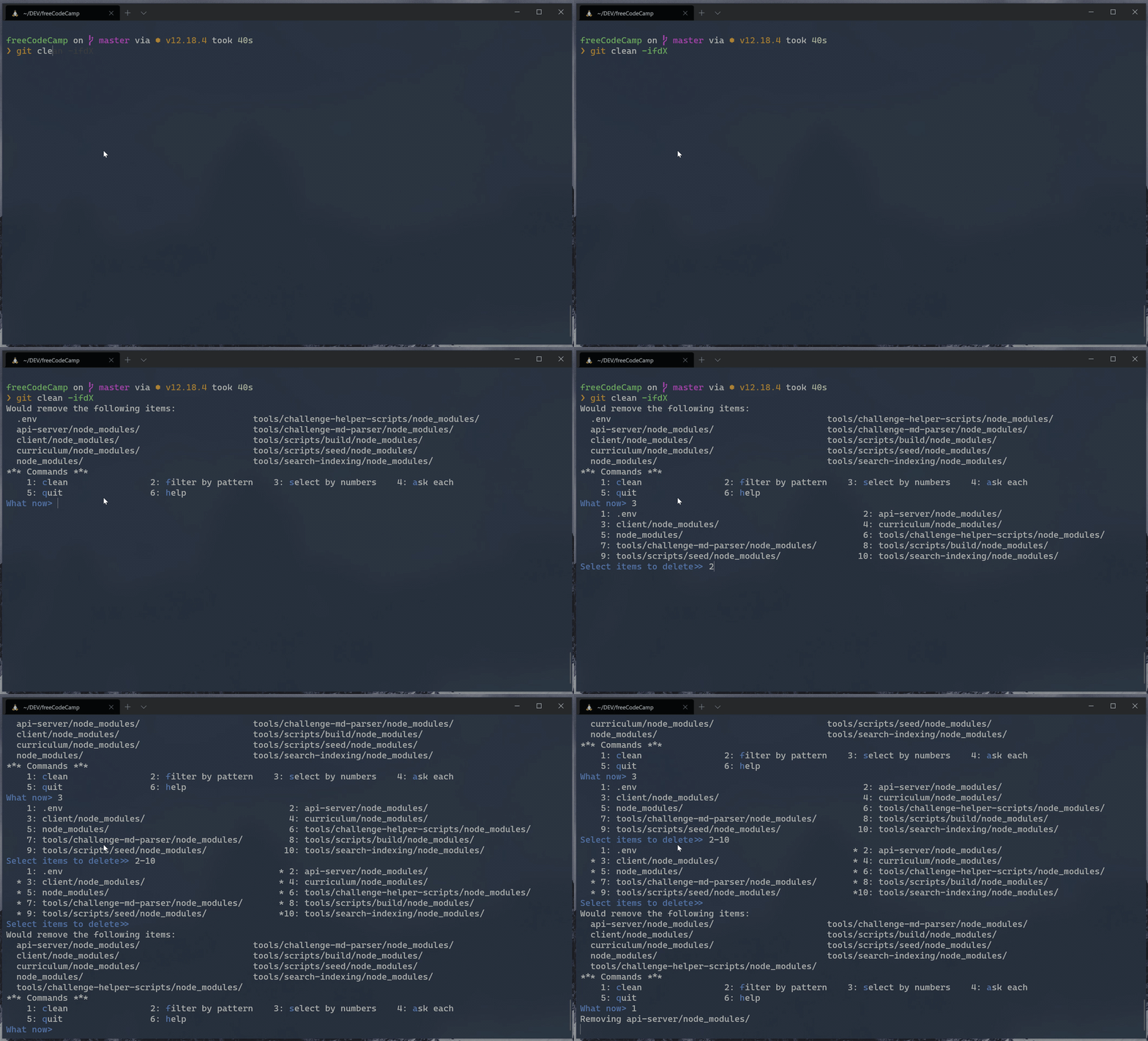
Use git clean in interactive mode:
git clean -ifdX
How to clean git untracked files (screenshot)
Issues with API, login, Challenge Submissions, etc.
If you can't sign in, and instead you see a banner with an error message that it will be reported to freeCodeCamp, please double-check that your local port 3000 is not in use by a different program.
macOS/Linux/WSL on Windows - From Terminal:
netstat -a | grep "3000"

tcp4    0   0    0.0.0.0:3000           DESKTOP      LISTEN
On Windows - From Elevated PowerShell:
netstat -ab | Select-String "3000"

TCP    0.0.0.0:3000           DESKTOP      LISTENING
Issues signing out while navigating
While in development, your session is stored as cookies. Clearing them will sign you out of your development account.
Running pnpm run seed:certified-user will log you out, too. It will overwrite the development user in your local database.
Issue getting 404 when navigating profile page
When you try to navigate to http://localhost:8000/developmentuser to view the profile page, Gatsby takes over serving the client-side pages and hence you will get a 404 page for the user profile when working.
There is a "Preview Custom 404 Page" button, click it to see the profile.
Issues installing dependencies
If you get errors while installing the dependencies, please make sure that you are not in a restricted network or your firewall settings do not prevent you from accessing resources.
The first time setup can take a while depending on your network bandwidth. Be patient, and if you are still stuck we recommend using GitPod instead of an offline setup.
Note
If you are using Apple Devices with M1 Chip to run the application locally, it is suggested to use Node v14.7 or above. You might run into issues with dependencies like Sharp otherwise.
Getting Help
If you are stuck and need help, feel free to ask questions in the 'Contributors' category on our forum or the contributors chat room.
There might be an error in the console of your browser or in Bash / Terminal / Command Line that will help identify the problem. Provide this error message in your problem description so others can more easily identify the issue and help you find a resolution.