
8.6 KiB
Cómo abrir una Pull Request (PR)
A pull request (PR), enables you to send changes from your fork on GitHub to freeCodeCamp.org's main repository. Una vez que haya hecho cambios en el código, puede seguir estas pautas para abrir un PR.
Esperamos que nuestros colaboradores conozcan el proceso específico de este proyecto. Following the guidelines carefully earns you the respect of fellow maintainers and saves everyone time.
Algunos ejemplos de ello son:
-
No edite archivos directamente a través de GitHub – mientras pueda, no es una buena idea.
-
Make sure the PR title follows our convention.
-
Asegúrate de seguir la lista de PR y no solo marcar las cosas; de lo contrario, no te tomaremos en serio.
-
Utilice la forma correcta de vincular problemas en la descripción del PR actualizando el
XXXXX. No solo añada números de emisión en cualquier lugar y donde le plazca. -
No usar "@mention" o solicitar comentarios demasiadas veces.
Entendemos que está emocionado por contribuir. As much as a maintainer will love to get back to you, they are busy people looking after hundreds of requests just like yours. Be patient, someone will get to you sooner or later.
-
Do not work directly off your
mainbranch - create a new branch for the changes you are working on.
[!NOTE] Your PR should be targeting changes to the English curriculum only. Read this guide instead for contributing to translations.
Prepare a Good PR Title
We use conventional title and messages for commits and pull requests. The convention has the following format:
<tipo>([ámbito opcional]): <descripción>Por ejemplo:
fix(learn): tests for the do...while loop challenge
Whenever you open a Pull Request (PR), you can use the below to determine the type, scope (optional), and description.
Type:
| Tipo | Cuándo seleccionar |
|---|---|
| fix | Changed or updated/improved functionality, tests, the wording of a lesson, etc. |
| feat | Sólo si está añadiendo nuevas funcionalidades, pruebas, etc. |
| chore | Cambios que no están relacionados con el código, las pruebas o la redacción de la lección. |
| docs | Cambios al directorio /docs o a las pautas de contribución, etc. |
Scope:
You can select a scope from this list of labels.
Description:
Keep it short (less than 30 characters) and simple; you can add more information in the PR description box and comments.
Some examples of good PR titles would be:
fix(a11y): contraste mejorado en la barra de búsquedafeat: se agregan más test a los retos de HTML y CSSfix(api,client): evitar errores CORS en el envío de formulariosdocs(i18n): se arreglan los enlaces para que sean relativos en lugar de absolutos
Proponer una Pull Request
-
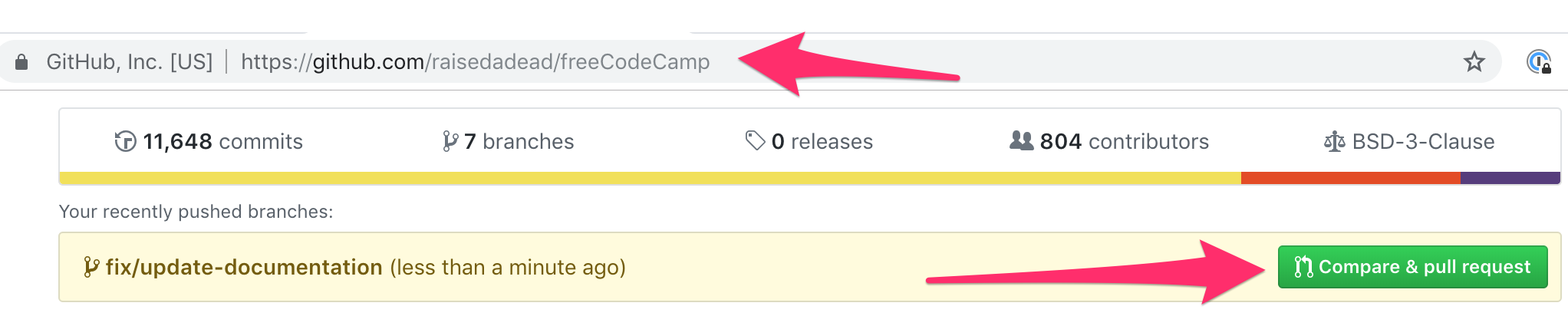
Once the edits have been committed, you will be prompted to create a pull request on your fork's GitHub Page.
See screenshot
-
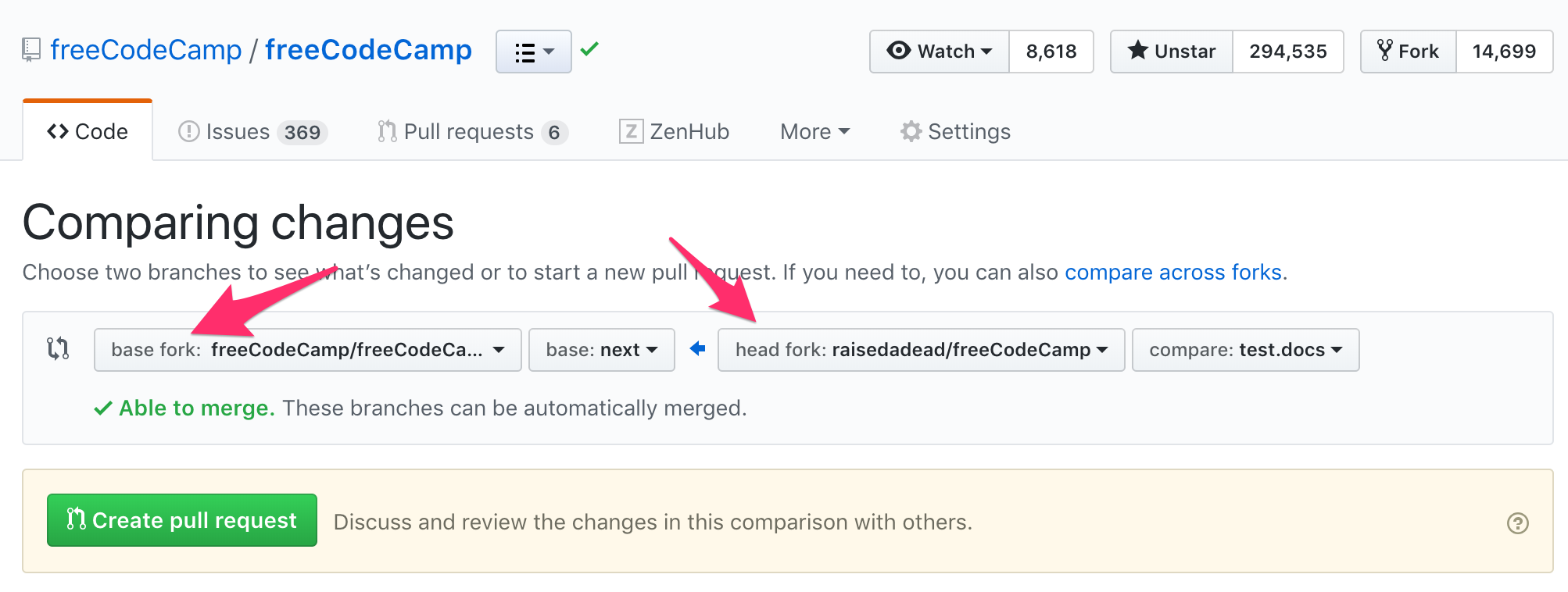
By default, all pull requests should be against the freeCodeCamp main repo,
mainbranch.Make sure that your Base Fork is set to freeCodeCamp/freeCodeCamp when raising a Pull Request.
See screenshot
-
Submit the pull request from your branch to freeCodeCamp's
mainbranch. -
Include a more detailed summary of the changes you made and how your changes are helpful in the body of your PR.
-
Se le presentará una plantilla de pull request. Esta es una lista de verificación que debería haber seguido antes de abrir la solicitud de pull request.
-
Rellene los detalles como considere oportuno. Ensure that you give the reviewers enough context to review the changes. If the PR makes changes to the UI, be sure to include screenshots of the changes as well. All of this information will be reviewed and the reviewers will decide whether or not your pull request is accepted.
-
Si el PR está pensado para abordar un problema existente de GitHub entonces, al final de el cuerpo de la descripción de su PR, use la palabra clave Cierra con el número de incidencia para cerrar automáticamente ese problema si se acepta y fusionan las relaciones públicas.
Ejemplo:
Cerrar #123cerrará el problema 123
-
-
Indicate if you have tested on a local copy of the site or not.
-
Esto es muy importante cuando se hagan cambios que no sean solo ediciones del contenido de texto como documentación o una descripción de un desafío. Examples of changes that need local testing include JavaScript, CSS, or HTML, which could change the functionality or layout of a page.
-
If your PR affects the behavior of a page, it should be accompanied by corresponding Playwright integration tests.
-
Feedback on Pull Requests
🎉 Enhorabuena por hacer una PR y muchas gracias por tomarse el tiempo para contribuir.
Our moderators will now take a look and leave you feedback. Please be patient with the fellow moderators and respect their time. All pull requests are reviewed in due course.
And as always, feel free to ask questions on the 'Contributors' category on our forum or the contributors chat room.
[!TIP] Si vas a contribuir con más PRs, te recomendamos que leas las directrices "haciendo cambios y sincronizando" para evitar la necesidad de borrar tu bifurcación.
Conflicts on a Pull Request
Conflicts can arise because many contributors work on the repository, and changes can break your PR which is pending a review and merge.
Since we squash all commits, you may not need to do a rebase. However, if a rebase is requested, check our For Usual Bug Fixes and Features or For Upcoming Curriculum and Features guides to learn how to do this process for your corresponding PR.
For Usual Bug Fixes and Features
When you are working on regular bugs and features on our development branch main, you are able to do a simple rebase:
-
Rebase your local copy:
git checkout <pr-branch> git pull --rebase upstream main -
Resolve any conflicts and add / edit commits
# Either git add . git commit -m "chore: resolve conflicts" # Or git add . git commit --amend --no-edit -
Push back your changes to the PR
git push --force origin <pr-branch>
For Upcoming Curriculum and Features
When you are working on features for our upcoming curriculum next-* branches, you have to do a cherry-pick:
-
Make sure your upstream comes in sync with your local:
git checkout main git fetch --all --prune git checkout next-python-projects git reset --hard upstream/next-python-projects -
Take a backup
a. Either delete your local branch after taking a backup (if you still have it locally):
git checkout <pr-branch-name>

# example:
# git checkout feat/add-numpy-video-question

git checkout -b <backup-branch-name>

# example:
#  git checkout -b backup-feat/add-numpy-video-question

git branch -D <pr-branch-name>
b. Or just a backup of your PR branch (if you do not have it locally):
git checkout -b <backup-branch-name> origin/<pr-branch-name> # example: # git checkout -b backup-feat/add-numpy-video-question origin/feat/add-numpy-video-question -
Start off with a clean slate:
git checkout -b <pr-branch-name> next-python-projects git cherry-pick <commit-hash> -
Resolve any conflicts, cleanup, and install dependencies and run tests
pnpm run clean pnpm install FCC_SUPERBLOCK='<superblock-name>' pnpm run test:curriculum # example: # FCC_SUPERBLOCK='python-for-everybody' pnpm run test:curriculum -
If everything looks good, push back to the PR
git push --force origin <pr-branch-name>