
47 lines
3.0 KiB
Markdown
47 lines
3.0 KiB
Markdown
---
|
|
description: Missing a connector?
|
|
---
|
|
|
|
# Custom or New Connector
|
|
|
|
If you'd like to **ask for a new connector,** you can request it directly [here](https://github.com/airbytehq/airbyte/issues/new?assignees=&labels=area%2Fintegration%2C+new-integration&template=new-integration-request.md&title=).
|
|
|
|
If you'd like to build new connectors and **make them part of the pool of pre-built connectors on Airbyte,** first a big thank you. We invite you to check our [contributing guide on building connectors](../contributing-to-airbyte/).
|
|
|
|
If you'd like to build new connectors, or update existing ones, **for your own usage,** without contributing to the Airbyte codebase, read along.
|
|
|
|
## Developing your own connector
|
|
|
|
It's easy to code your own connectors on Airbyte. Here is a link to instruct on how to code new sources and destinations: [building new connectors](../contributing-to-airbyte/)
|
|
|
|
While the guides in the link above are specific to the languages used most frequently to write integrations, **Airbyte connectors can be written in any language**. Please reach out to us if you'd like help developing connectors in other languages.
|
|
|
|
## Adding your connectors in the UI
|
|
|
|
There are only 3 easy steps to do that:
|
|
|
|
1.Get the `Docker` coordinate of a custom connector from `Dockerhub` \(or any image repository that Airbyte can access\).
|
|
|
|
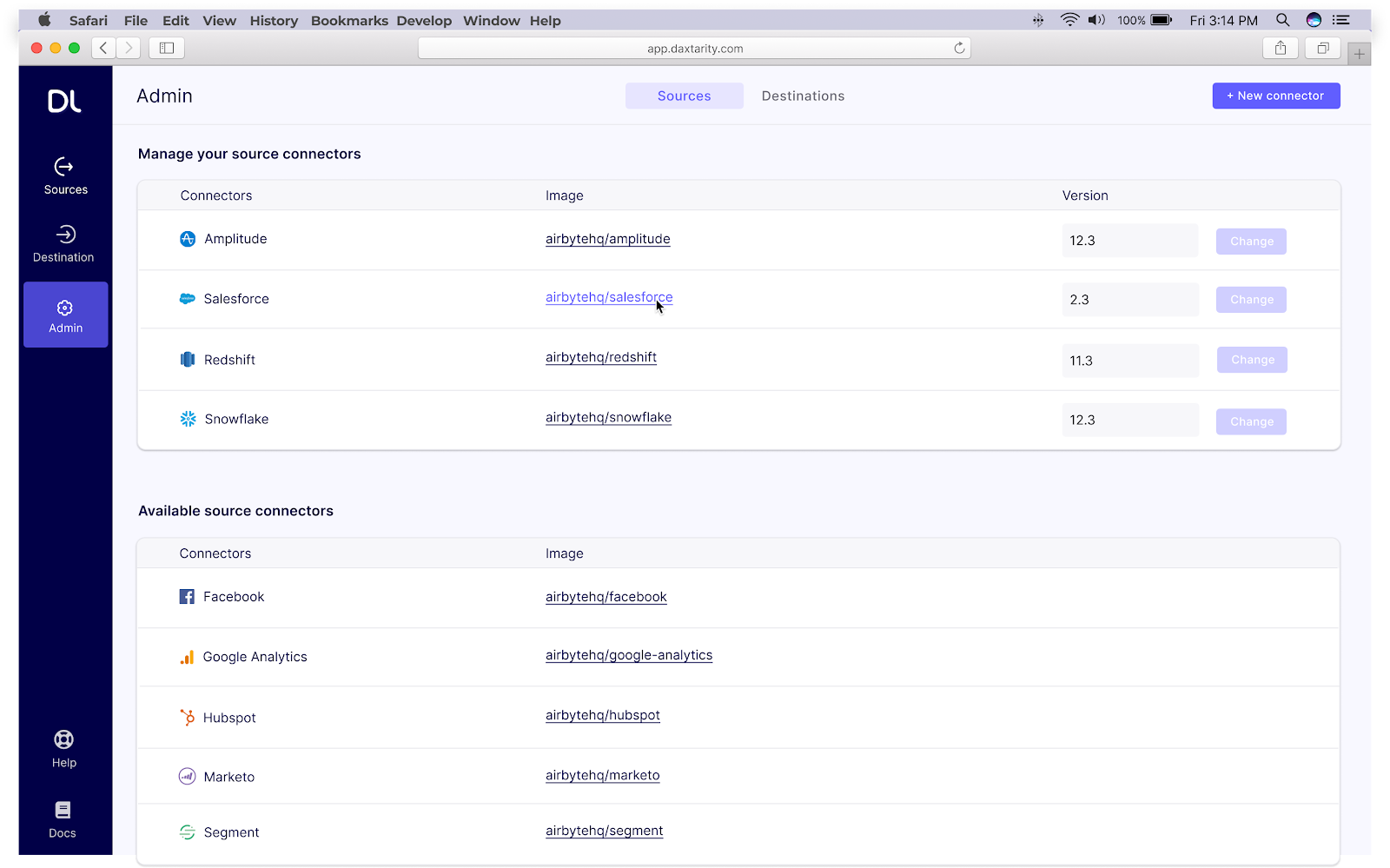
2.In the UI, go to the Admin section, and click on `[+ New connector]` on the top right
|
|
|
|
|
|
|
|
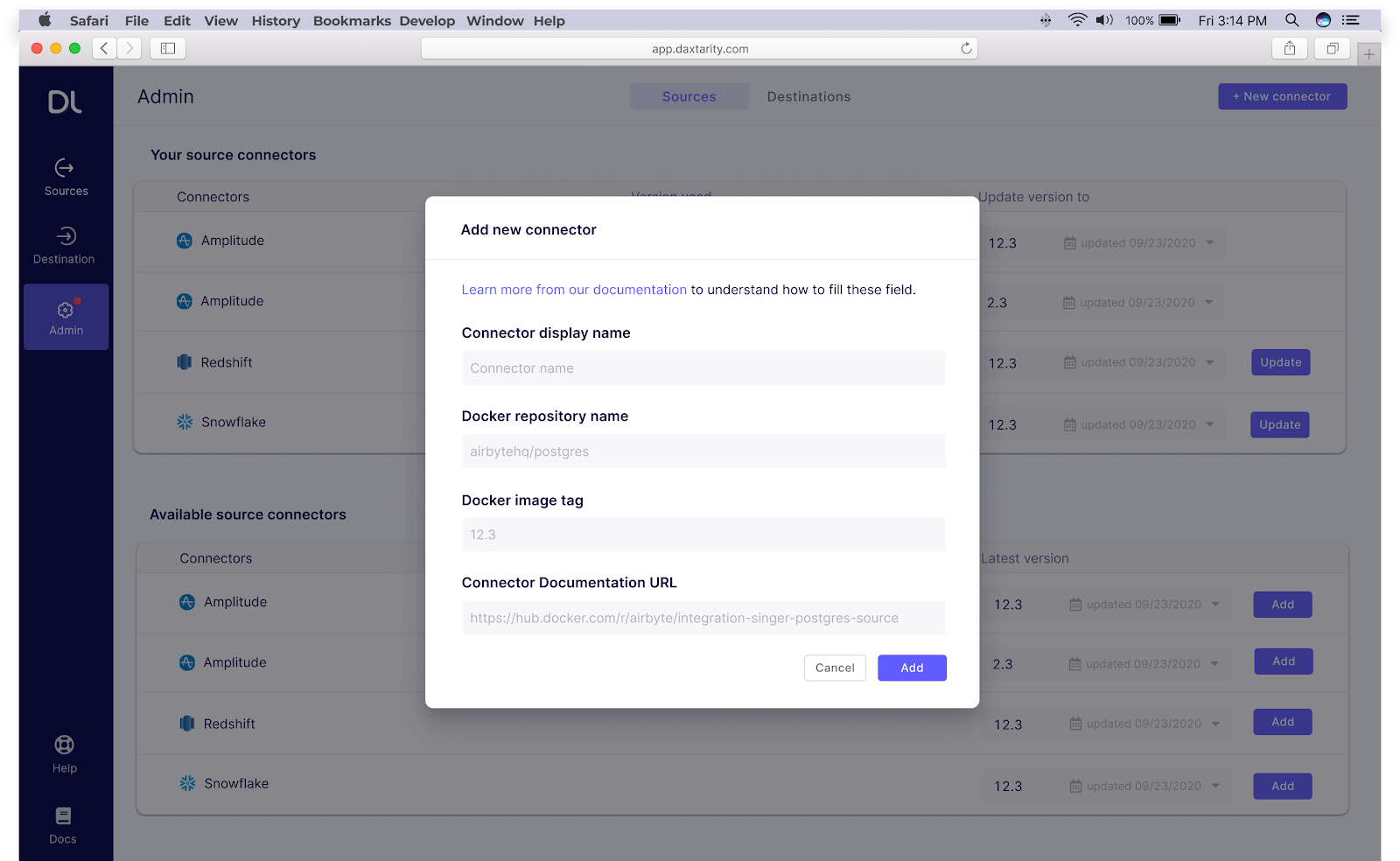
3.We will ask you for the display name, the Docker repository name (repository + image name), tag and documentation URL for that connector.
|
|
|
|
|
|
|
|
Once this is filled, you will see your connector in the UI and your team will be able to use it, **from the UI and Airbyte's API too.**
|
|
|
|
Note that this new connector could just be an updated version of an existing connector that you adapted to your specific edge case. Anything is possible!
|
|
|
|
When using Airbyte on Kubernetes, the repository name must be a valid Kubernetes name. That is, it must consist of lower case alphanumeric characters or '-', and must start and end with an alphanumeric character (e.g. 'my-name', or '123-abc'). Other names will work locally on Docker but cause an error on Kubernetes (Internal Server Error: Get Spec job failed).
|
|
|
|
## Upgrading a connector
|
|
|
|
To upgrade your connector version, go to the admin panel in the left hand side of the UI, find this connector in the list, and input the latest connector version.
|
|
|
|

|
|
|
|
To browse the available connector versions, simply click on the relevant link in the `Image` column to navigate to the connector's DockerHub page. From there, simply click on the `Tags` section in the top bar.
|
|
|